 bdbb2527e6
All checks were successful
Sync To /home/ubuntu/gfps / sync (push) Successful in 2s
Change-Id: I71e676b997159a141ca07d16f82a73b45f4b2410
283 lines
16 KiB
Markdown
283 lines
16 KiB
Markdown
# 3.2.3 Fast Pair Validator 环境搭建
|
||
|
||
<span style="color: rgb(0,0,0);"></span><style type="text/css">/**/
|
||
div.rbtoc1777701144315 {padding: 0px;}
|
||
div.rbtoc1777701144315 ul {margin-left: 0px;}
|
||
div.rbtoc1777701144315 li {margin-left: 0px;padding-left: 0px;}
|
||
|
||
/**/</style>
|
||
|
||
<div class="toc-macro rbtoc1777701144315">
|
||
|
||
- [1 搭建手机端的测试环境](#id-3.2.3FastPairValidator环境搭建-1搭建手机端的测试环境)
|
||
- [1.1 手机需要连接google网络](#id-3.2.3FastPairValidator环境搭建-1.1手机需要连接google网络)
|
||
- [1.2 手机不可以打开勿扰模式,不然可能看不到弹窗](#id-3.2.3FastPairValidator环境搭建-1.2手机不可以打开勿扰模式,不然可能看不到弹窗)
|
||
- [1.3 检查手机是否打开Google Play服务通知](#id-3.2.3FastPairValidator环境搭建-1.3检查手机是否打开GooglePlay服务通知)
|
||
- [1.4 检查google play 服务是否更新到最新的版本](#id-3.2.3FastPairValidator环境搭建-1.4检查googleplay服务是否更新到最新的版本)
|
||
- [1.5 登陆google账号](#id-3.2.3FastPairValidator环境搭建-1.5登陆google账号)
|
||
- [1.6 打开自动同步数据功能](#id-3.2.3FastPairValidator环境搭建-1.6打开自动同步数据功能)
|
||
- [1.7 检查Show notification是否打开:](#id-3.2.3FastPairValidator环境搭建-1.7检查Shownotification是否打开:)
|
||
- [1.8 Setting界面打开蓝牙,以及位置信息。](#id-3.2.3FastPairValidator环境搭建-1.8Setting界面打开蓝牙,以及位置信息。)
|
||
- [1.9 Enable debug mode ID:](#id-3.2.3FastPairValidator环境搭建-1.9EnabledebugmodeID:)
|
||
- [1.10 Check Google Play Service version](#id-3.2.3FastPairValidator环境搭建-1.10CheckGooglePlayServiceversion)
|
||
- [1.11 注册成为google beta tester(内部测试账号已经注册过了,这一步不需要,如果是客户自己注册的Google账号,需要提醒客户check)](#id-3.2.3FastPairValidator环境搭建-1.11注册成为googlebetatester(内部测试账号已经注册过了,这一步不需要,如果是客户自己注册的Google账号,需要提醒客户check))
|
||
- [2 Fast Pair Validator APP安装](#id-3.2.3FastPairValidator环境搭建-2FastPairValidatorAPP安装)
|
||
- [3 Enable fast pair validator app中的测项](#id-3.2.3FastPairValidator环境搭建-3Enablefastpairvalidatorapp中的测项)
|
||
- [3.1 安装adb:](#id-3.2.3FastPairValidator环境搭建-3.1安装adb:)
|
||
- [3.2 输入如下命令:](#id-3.2.3FastPairValidator环境搭建-3.2输入如下命令:)
|
||
- [4 uninstall amazon 相关app](#id-3.2.3FastPairValidator环境搭建-4uninstallamazon相关app)
|
||
- [5 测试账号和MODEL ID](#id-3.2.3FastPairValidator环境搭建-5测试账号和MODELID)
|
||
- [6 测试准备](#id-3.2.3FastPairValidator环境搭建-6测试准备)
|
||
- [7 GFPS LEA 环境搭建](#id-3.2.3FastPairValidator环境搭建-7GFPSLEA环境搭建)
|
||
- [1 官网测试spec请参考 https://developers.google.com/nearby/fast-pair/lea-validator-app-user-manual](#id-3.2.3FastPairValidator环境搭建-1官网测试spec请参考https://developers.google.com/nearby/fast-pair/lea-validator-app-user-manual)
|
||
- [2 setting 界面需要 enable Bypass Bluetooth LE audio,然后重启手机](#id-3.2.3FastPairValidator环境搭建-2setting界面需要enableBypassBluetoothLEaudio,然后重启手机)
|
||
- [3 Google 提供的文档 \[RealTek\] Validator App LE Spec User Manual.pptx](#id-3.2.3FastPairValidator环境搭建-3Google提供的文档)
|
||
- [4 测试账号需要加入Google test group(内部测试账号已添加,qc不需要关注,如果是客户自己注册的账号,需要提醒客户添加)](#id-3.2.3FastPairValidator环境搭建-4测试账号需要加入Googletestgroup(内部测试账号已添加,qc不需要关注,如果是客户自己注册的账号,需要提醒客户添加))
|
||
|
||
</div>
|
||
|
||
### <span style="color: rgb(0,0,0);">1 搭建手机端的测试环境</span>
|
||
|
||
测试手机建议使用Google pixel手机,请<span style="color: rgb(255,0,0);">**务必确保**</span>手机端有打开开发者选项 <a href="https://developer.android.com/studio/debug/dev-options?hl=zh-cn" class="external-link" rel="nofollow">https://developer.android.com/studio/debug/dev-options?hl=zh-cn</a>
|
||
|
||
\
|
||
|
||
#### 1.1 手机需要连接google网络
|
||
|
||
该网络必须可以登陆google的网站,在测试前请先测试一下是否可以登录google的网站(<span style="color: rgb(255,0,0);">**建议试试能不能打开youtube之类的**</span>)。
|
||
|
||
#### 1.2 手机不可以打开勿扰模式,不然可能看不到弹窗
|
||
|
||

|
||
|
||
#### 1.3 检查手机是否打开Google Play服务通知
|
||
|
||
Setting-\>(Apps¬ification or Apps)应用和通知-\> See all apps -\>Google Play服务-\>通知-\>All Google Play services notifications, 开启(显示通知)
|
||
|
||

|
||
|
||
#### 1.4 检查google play 服务是否更新到最新的版本
|
||
|
||
setting-\>(Apps¬ification or Apps)应用和通知-\>See all apps-\>Google Play 服务-\>高级-\>商店, 点击 App details or google play,界面会跳转到google play 商店,点击更新.
|
||
|
||
如果已经成为 beta tester, google play service可能会自动更新到最新的。
|
||
|
||

|
||
|
||

|
||
|
||
\
|
||
|
||
#### 1.5 登陆google账号
|
||
|
||
Settings\>Accounts or Seetings-\>Google(<span style="color: rgb(255,0,0);">内部</span><span style="color: rgb(255,0,0);">账号(不可给客户):</span>
|
||
|
||
<span style="color: rgb(255,0,0);"><span style="color: rgb(0,0,0);"><span style="color: rgb(255,0,0);"><span style="color: rgb(23,43,77);"><span style="color: rgb(0,0,0);"><span style="color: rgb(255,0,0);">Fast Pair Validator 测试 请使用 </span></span></span></span></span></span><span style="color: rgb(255,0,0);"><a href="mailto:realsilbt8888@gmail.com" class="external-link" rel="nofollow">realsilbt8888@gmail.com</a><span style="color: rgb(23,43,77);"> </span><span style="color: rgb(23,43,77);"> </span></span>
|
||
|
||
<span style="color: rgb(255,0,0);"><span style="color: rgb(23,43,77);">手动测试账号请参考 <span style="color: rgb(255,0,0);"><a href="https://wiki.realtek.com/pages/viewpage.action?pageId=394285307" rel="nofollow">Google 账号 - BT_Market - WIKI (realtek.com)</a> </span></span></span>
|
||
|
||
#### 1.6 打开自动同步数据功能
|
||
|
||
由于GFPS的account key是存在google账号的云端的,所以必须要登陆google账号并且需要打开自动同步数据功能
|
||
|
||
Settings\>Accounts :
|
||
|
||

|
||
|
||
or
|
||
|
||
Seetings→Google:
|
||
|
||

|
||
|
||
#### 1.7 检查Show notification是否打开:
|
||
|
||
Settings\>Google\>(Devices & sharing)\>Devices(设置\>Google\>设备连接\>设备\>)
|
||
|
||
pixel 2xl:
|
||
|
||

|
||
|
||
pixel 7:
|
||
|
||

|
||
|
||
\
|
||
|
||
跑 Fast pair validator 测试之前关掉 Automatically save devices
|
||
|
||
**<span style="color: rgb(255,0,0);">Note: 只有realsilbt8888的账号需要关掉 Automatically save devices, 其他手动测试的账号Automatically save devices需要打开</span>**
|
||
|
||

|
||
|
||
\
|
||
|
||
#### 1.8 Setting界面打开蓝牙,以及位置信息。
|
||
|
||
\
|
||
|
||
#### 1.9 Enable debug mode ID:
|
||
|
||
The model ID provided to you is a debug mode ID. To enable it, go to Settings \> Google \> Devices & sharing \> Devices \> top right 3 dot menu to enable “Include debug results”.
|
||
|
||
If the option “Include debug results” is missing in this page, please ensure Developer options in the phone is enabled.
|
||
|
||
or go to Settings \> Google \> Devices & sharing \> Devices \>“Include debug results”
|
||
|
||
Settings \> Google \> Devices & sharing \> Devices \> top right 3 dot menu to enable “Include debug results”
|
||
|
||

|
||
|
||
or
|
||
|
||
Settings \> Google \> Devices & sharing \> Devices \>“Include debug results”
|
||
|
||

|
||
|
||
<a href="https://developer.android.com/studio/debug/dev-options?hl=zh-cn" class="external-link" rel="nofollow">https://developer.android.com/studio/debug/dev-options?hl=zh-cn</a>
|
||
|
||
#### <span class="devsite-heading">1.10 Check Google Play Service version</span>
|
||
|
||
Purpose: To confirm we use right version of Fast Pair module for testing
|
||
|
||
Go to Settings \> Apps¬ification or Apps\>google play services \> advanced, then check Google Play services version (It should be 20.XX.XX or higher).
|
||
|
||

|
||
|
||
\
|
||
|
||
\
|
||
|
||
#### **<span style="color: rgb(255,0,0);">1.11 注册成为google beta tester(内部测试账号已经注册过了,这一步不需要,如果是客户自己注册的Google账号,需要提醒客户check)</span>**
|
||
|
||
Sign up for the Google Play services beta program\
|
||
<a href="https://play.google.com/apps/testing/com.google.android.gms" class="external-link" rel="nofollow">https://play.google.com/apps/testing/com.google.android.gms</a>
|
||
|
||
join the Android Beta group at <a href="https://www.google.com/android/beta" class="external-link" rel="nofollow"><span>https://www.google.com/android/beta</span></a> to get latest update via OTA
|
||
|
||
Finder/Find Hub testing program please Navigate to <a href="https://play.google.com/apps/testing/com.google.android.apps.adm" class="external-link" rel="nofollow">https://play.google.com/apps/testing/com.google.android.apps.adm</a>
|
||
|
||
如果没有权限添加,FAE需要联系YingTsung (YT) Lin, 请他发邮件给Google, 让Google把客户注册的Google账号添加到Google的Test group。
|
||
|
||
可以登陆Google账号之后在以下链接查看是否有添加成功:<a href="https://groups.google.com/my-groups" class="external-link" rel="nofollow">我的群组</a>
|
||
|
||

|
||
|
||
需要注意的是:
|
||
|
||

|
||
|
||
### **<span style="color: rgb(153,51,0);">2 Fast Pair Validator APP安装</span>**
|
||
|
||
确认手机是否安装 Fast Pair Validator APP
|
||
|
||
<span style="color: rgb(0,0,0);">Fast pair validator app 图标如下图:</span>
|
||
|
||
<span style="color: rgb(153,51,0);"></span>
|
||
|
||
如果没有安装:
|
||
|
||
去 Play Store/应用商店 下载 <span style="color: rgb(0,0,0);">Fast Pair Validator APP并且安装。</span>
|
||
|
||
如果已经安装:
|
||
|
||
确认安装的是否是最新版。不是最新版,请手动升级到最新版。确认步骤如下:
|
||
|
||
长按 Fast Pair Validator 图标,会看到App info
|
||
|
||

|
||
|
||
点击App info,会看到App details
|
||
|
||

|
||
|
||
点击App details,会看到以下页面,如果有新版本请手动更新到最新的版本。如果是beta版本则不需要更新,系统会自动帮忙更新。
|
||
|
||

|
||
|
||
### <span style="color: rgb(153,51,0);">3 </span><span style="color: rgb(153,51,0);">Enable fast pair validator app中的测项</span>
|
||
|
||
#### <span style="color: rgb(32,33,36);"><span style="color: black;">3.1 安装adb:</span></span>
|
||
|
||
<span style="color: rgb(32,33,36);"><span style="color: black;"><a href="https://wiki.realtek.com/pages/viewpage.action?pageId=87464469" rel="nofollow">adb安装及使用方法</a> 该wiki上提供的adb版本太旧,会出现device offline的问题,下载最新的<a href="https://adbshell.com/downloads" class="external-link" rel="nofollow">https://adbshell.com/downloads</a></span></span>
|
||
|
||
<span style="color: rgb(32,33,36);">安装adb之后找到adb.exe所在的目录,在该目录下打开cmd命令行</span>
|
||
|
||
#### 3.2 输入如下命令:
|
||
|
||
adb shell am broadcast -a com.google.location.nearby.apps.fastpair.validator.FLAG_OVERRIDE --es flag enable_features_for_v3 --es value true --es type boolean com.google.location.nearby.apps.fastpair.validator
|
||
|
||

|
||
|
||
按enter执行命令。
|
||
|
||
命令执行成功之后,
|
||
|
||
打开fast pair validator 能看到新的feature
|
||
|
||
\
|
||
|
||
### <span style="color: rgb(0,0,0);">4 uninstall amazon 相关app</span>
|
||
|
||
<span style="color: rgb(0,0,0);">Alexa (com.amazon.dee.app) 和com.amazon.wellness app, 会影响到Validator的测试,需要Uninstall。</span>
|
||
|
||
<span style="color: rgb(0,0,0);">The Alexa (com.amazon.dee.app) took too much time on handling the ACL_CONNECTED intent, which impacts the Validator's flow.</span>
|
||
|
||
<span style="color: rgb(0,0,0);">There is still another **app,com.amazon.wellness** app, who handled ACL_CONNECTED for 20+ seconds.Please uninstall it as well.</span>
|
||
|
||
<span style="color: rgb(255,0,0);">现象: End-to-end integration测试,出现Pairing timeout</span>
|
||
|
||
<span style="color: rgb(255,0,0);">操作方式: </span>
|
||
|
||
<span style="color: rgb(255,0,0);">adb uninstall com.amazon.wellness</span>
|
||
|
||
<span style="color: rgb(255,0,0);">adb uninstall com.amazon.dee.app</span>
|
||
|
||
\
|
||
|
||
### <span style="color: rgb(153,51,0);">5 测试账号和MODEL ID</span>
|
||
|
||
使用Fast Pair Validator测试,需要先登陆Google账号,测试设备使用的Model ID,public key, private key 必须是该google账号注册的Device。
|
||
|
||
场内测试账号:<a href="mailto:realsilbt8888@gmail.com" class="external-link" rel="nofollow">realsilbt8888@gmail.com</a>
|
||
|
||
**<span style="color: rgb(255,0,0);">Note:</span>**
|
||
|
||
fast pair validator app使用的model id 要和DUT开发板配置的model id一致。
|
||
|
||

|
||
|
||
### **<span style="color: rgb(153,51,0);">6 测试准备</span>**
|
||
|
||
测试过程中需要注意
|
||
|
||
<span style="color: rgb(255,0,0);">手机端弹出配对提示框时不要手动点击,fast pair validator app会自己触发配对</span>.
|
||
|
||
开始测试前,需要确认是否已经和待测试耳机配对过,需要删除配对信息。 最后最好在开始测试前,开关一下飞行模式。
|
||
|
||
点击GOT IT开始测试时,耳机端一定要处于Pairable mode,否则会scan不到设备, scan 到设备后,点击Test开始测试。
|
||
|
||

|
||
|
||
\
|
||
|
||
### 7 GFPS LEA 环境搭建
|
||
|
||
#### 1 官网测试spec请参考 <a href="https://developers.google.com/nearby/fast-pair/lea-validator-app-user-manual" class="external-link" rel="nofollow">https://developers.google.com/nearby/fast-pair/lea-validator-app-user-manual</a>
|
||
|
||
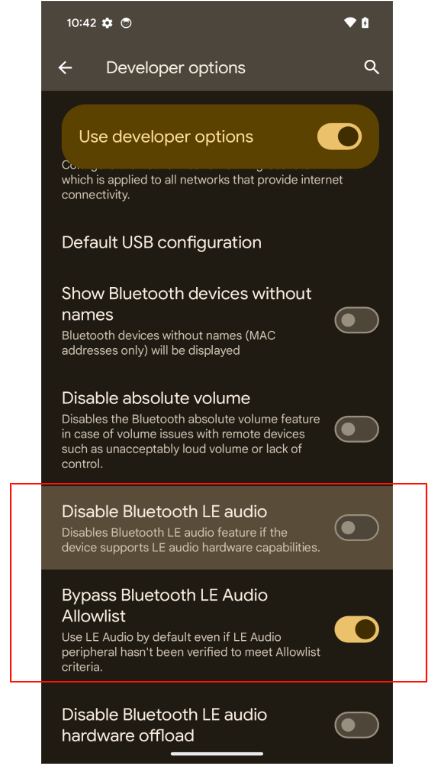
#### 2 setting 界面需要 enable Bypass Bluetooth LE audio,然后重启手机
|
||
|
||
|
||
|
||
#### 3 Google 提供的文档 <a href="#" class="unresolved">[RealTek] Validator App LE Spec User Manual.pptx</a>
|
||
|
||
#### 4 测试账号需要加入Google test group(<span style="color: rgb(255,0,0);">**内部测试账号已添加,qc不需要关注,如果是客户自己注册的账号,需要提醒客户添加**</span>)
|
||
|
||
- Ensure your testing emails are part of the <a href="mailto:fast-pair-integrations@google.com" class="external-link" rel="nofollow">Fast Pair Partner Testing Group</a>.
|
||
|
||
- It may take 6-24 hours for newly registered emails and phones to synchronize permissions.
|
||
|
||
- Logging in and out of the associated Google Account may also trigger an immediate sync.
|
||
|
||
\
|