# 5.2.3 Fast Pair Validator 环境搭建
- [1 搭建手机端的测试环境](#id-5.2.3FastPairValidator环境搭建-1搭建手机端的测试环境)
- [1.1 手机需要连接google网络](#id-5.2.3FastPairValidator环境搭建-1.1手机需要连接google网络)
- [1.2 手机不可以打开勿扰模式,不然可能看不到弹窗](#id-5.2.3FastPairValidator环境搭建-1.2手机不可以打开勿扰模式,不然可能看不到弹窗)
- [1.3 检查手机是否打开Google Play服务通知](#id-5.2.3FastPairValidator环境搭建-1.3检查手机是否打开GooglePlay服务通知)
- [1.4 检查google play 服务是否更新到最新的版本](#id-5.2.3FastPairValidator环境搭建-1.4检查googleplay服务是否更新到最新的版本)
- [1.5 登陆google账号](#id-5.2.3FastPairValidator环境搭建-1.5登陆google账号)
- [1.6 打开自动同步数据功能](#id-5.2.3FastPairValidator环境搭建-1.6打开自动同步数据功能)
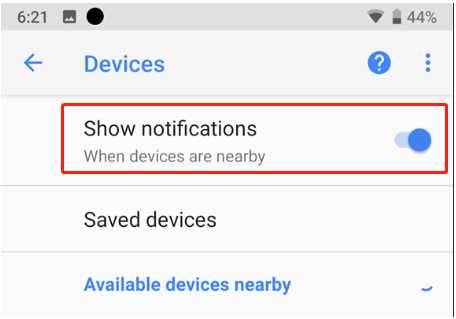
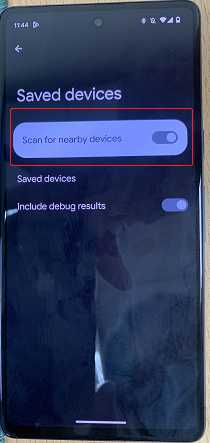
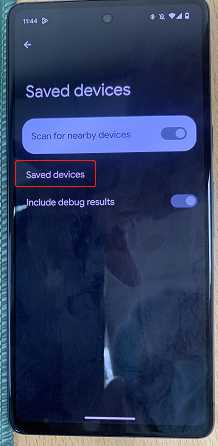
- [1.7 检查Show notification是否打开:](#id-5.2.3FastPairValidator环境搭建-1.7检查Shownotification是否打开:)
- [1.8 Setting界面打开蓝牙,以及位置信息。](#id-5.2.3FastPairValidator环境搭建-1.8Setting界面打开蓝牙,以及位置信息。)
- [1.9 Enable debug mode ID:](#id-5.2.3FastPairValidator环境搭建-1.9EnabledebugmodeID:)
- [1.10 Check Google Play Service version](#id-5.2.3FastPairValidator环境搭建-1.10CheckGooglePlayServiceversion)
- [1.11 注册成为google beta tester(内部测试账号已经注册过了,这一步不需要,如果是客户自己注册的Google账号,需要提醒客户check)](#id-5.2.3FastPairValidator环境搭建-1.11注册成为googlebetatester(内部测试账号已经注册过了,这一步不需要,如果是客户自己注册的Google账号,需要提醒客户check))
- [2 Fast Pair Validator APP安装](#id-5.2.3FastPairValidator环境搭建-2FastPairValidatorAPP安装)
- [3 Enable fast pair validator app中的测项](#id-5.2.3FastPairValidator环境搭建-3Enablefastpairvalidatorapp中的测项)
- [3.1 安装adb:](#id-5.2.3FastPairValidator环境搭建-3.1安装adb:)
- [3.2 输入如下命令:](#id-5.2.3FastPairValidator环境搭建-3.2输入如下命令:)
- [4 uninstall amazon 相关app](#id-5.2.3FastPairValidator环境搭建-4uninstallamazon相关app)
- [5 测试账号和MODEL ID](#id-5.2.3FastPairValidator环境搭建-5测试账号和MODELID)
- [6 测试准备](#id-5.2.3FastPairValidator环境搭建-6测试准备)
- [7 Find hub 环境搭建:](#id-5.2.3FastPairValidator环境搭建-7Findhub环境搭建:)
- [1.认证实验室会重新跑 fast pair validator中finder相关的测项,所以送认证前最好提供各个测项的操作视频以及详细的操作步骤(如何开机,如何factory reset,如何进pairing mode..)](#id-5.2.3FastPairValidator环境搭建-1.认证实验室会重新跑fastpairvalidator中finder相关的测项,所以送认证前最好提供各个测项的操作视频以及详细的操作步骤(如何开机,如何factoryreset,如何进pairingmode..))
- [2.如果测试手机支援LEA, 开发者选项中将 Bypass Bluetooth LE Audio 选项关掉,然后重启手机](#id-5.2.3FastPairValidator环境搭建-2.如果测试手机支援LEA,开发者选项中将BypassBluetoothLEAudio选项关掉,然后重启手机)
- [3.一定要等所有的测项都测试PASS之后才可以提交测试结果](#id-5.2.3FastPairValidator环境搭建-3.一定要等所有的测项都测试PASS之后才可以提交测试结果)
- [4. Fast pair validator enable EDDYSTONE:](#id-5.2.3FastPairValidator环境搭建-4.FastpairvalidatorenableEDDYSTONE:)
- [1.打开fast pair validator, 登陆Google账号,找到和耳机对应的model id,点击model id之后会看到EDDYSTONE, 点击进行测试](#id-5.2.3FastPairValidator环境搭建-1.打开fastpairvalidator,登陆Google账号,找到和耳机对应的modelid,点击modelid之后会看到EDDYSTONE,点击进行测试)
- [2.如果看不到 EDDYSTONE, 需要 adb 执行以下两个commands:](#id-5.2.3FastPairValidator环境搭建-2.如果看不到EDDYSTONE,需要adb执行以下两个commands:)
- [3 For locator tags that don't create a bond during pairing, also run the following command:](#id-5.2.3FastPairValidator环境搭建-3Forlocatortagsthatdon'tcreateabondduringpairing,alsorunthefollowingcommand:)
- [3.然后选择EDDYSTONE 进行测试:](#id-5.2.3FastPairValidator环境搭建-3.然后选择EDDYSTONE进行测试:)
- [4.Finder Fast Pair Validator EDDYSTONE测试完成。测试结果提交:](#id-5.2.3FastPairValidator环境搭建-4.FinderFastPairValidatorEDDYSTONE测试完成。测试结果提交:)
### 1 搭建手机端的测试环境
测试手机建议使用Google pixel手机,请**务必确保**手机端有打开开发者选项 https://developer.android.com/studio/debug/dev-options?hl=zh-cn
\
#### 1.1 手机需要连接google网络
该网络必须可以登陆google的网站,在测试前请先测试一下是否可以登录google的网站(**建议试试能不能打开youtube之类的**)。
#### 1.2 手机不可以打开勿扰模式,不然可能看不到弹窗
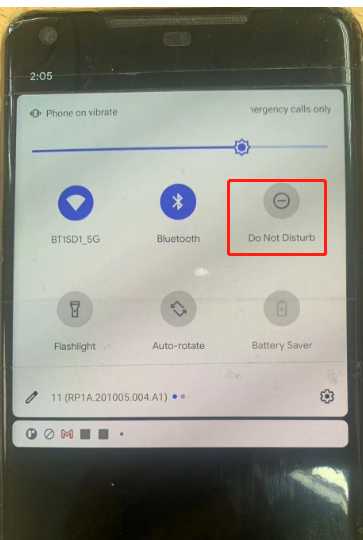
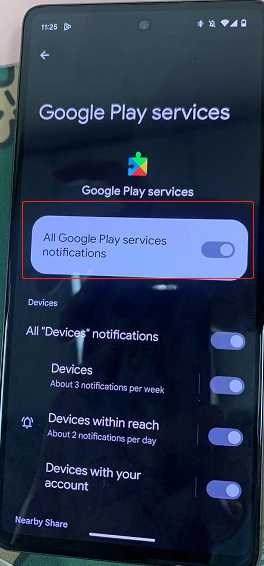
#### 1.3 检查手机是否打开Google Play服务通知
Setting-\>(Apps¬ification or Apps)应用和通知-\> See all apps -\>Google Play服务-\>通知-\>All Google Play services notifications, 开启(显示通知)
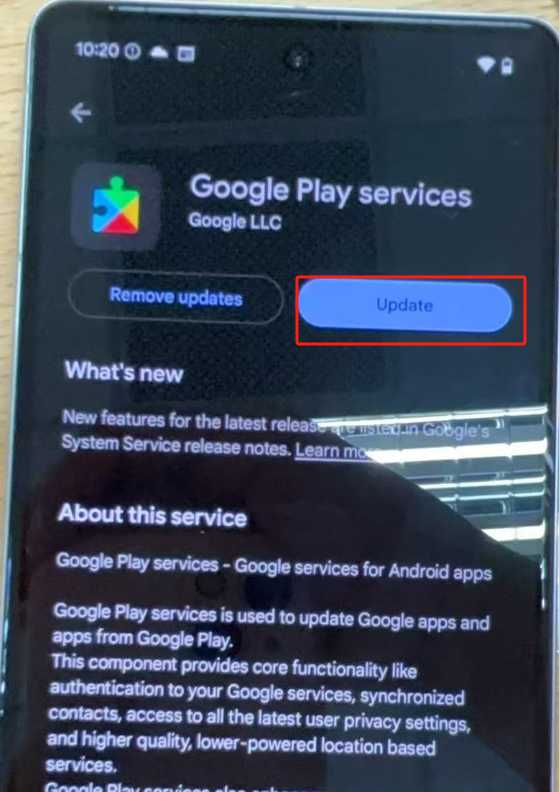
#### 1.4 检查google play 服务是否更新到最新的版本
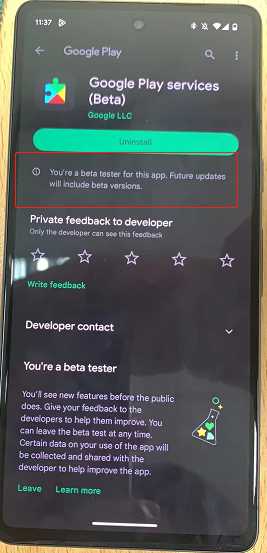
setting-\>(Apps¬ification or Apps)应用和通知-\>See all apps-\>Google Play 服务-\>高级-\>商店, 点击 App details or google play,界面会跳转到google play 商店,点击更新.
如果已经成为 beta tester, google play service可能会自动更新到最新的。
\
#### 1.5 登陆google账号
Settings\>Accounts or Seetings-\>Google(内部账号(不可给客户):
Fast Pair Validator 测试 请使用 realsilbt8888@gmail.com
手动测试账号请参考 Google 账号 - BT_Market - WIKI (realtek.com)
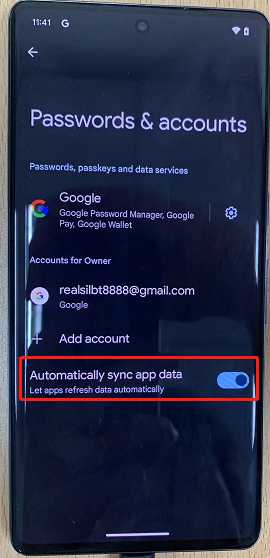
#### 1.6 打开自动同步数据功能
由于GFPS的account key是存在google账号的云端的,所以必须要登陆google账号并且需要打开自动同步数据功能
Settings\>Accounts :
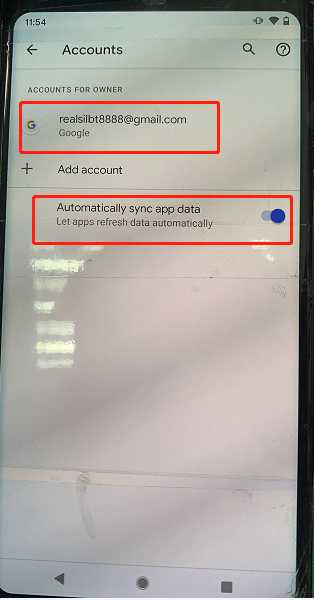
or
Seetings→Google:
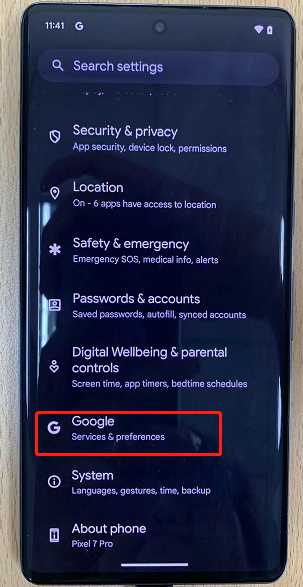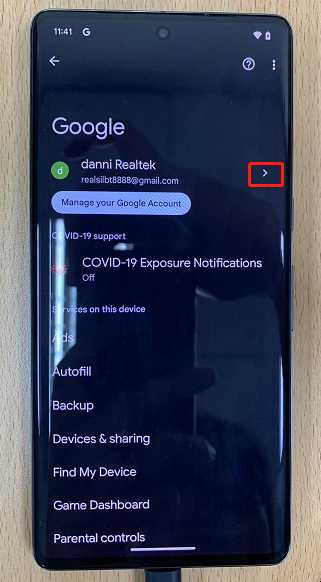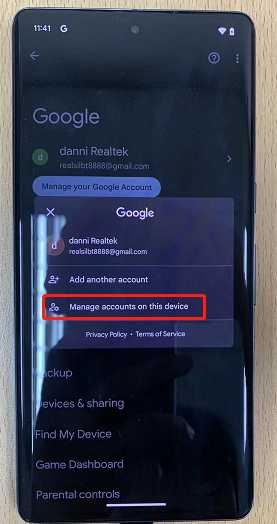
#### 1.7 检查Show notification是否打开:
Settings\>Google\>(Devices & sharing)\>Devices(设置\>Google\>设备连接\>设备\>)
pixel 2xl:
pixel 7:
\
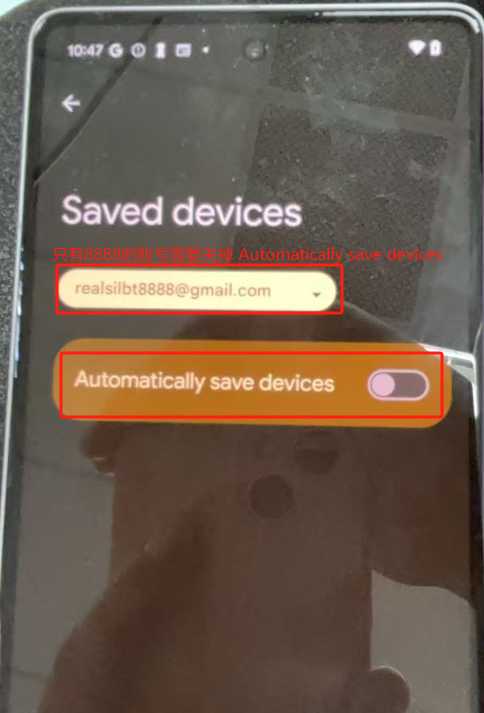
跑 Fast pair validator 测试之前关掉 Automatically save devices
**Note: 只有realsilbt8888的账号需要关掉 Automatically save devices, 其他手动测试的账号Automatically save devices需要打开**
\
#### 1.8 Setting界面打开蓝牙,以及位置信息。
\
#### 1.9 Enable debug mode ID:
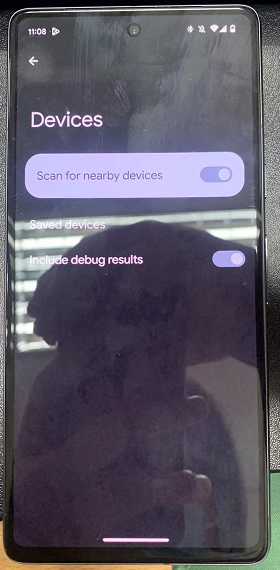
The model ID provided to you is a debug mode ID. To enable it, go to Settings \> Google \> Devices & sharing \> Devices \> top right 3 dot menu to enable “Include debug results”.
If the option “Include debug results” is missing in this page, please ensure Developer options in the phone is enabled.
or go to Settings \> Google \> Devices & sharing \> Devices \>“Include debug results”
Settings \> Google \> Devices & sharing \> Devices \> top right 3 dot menu to enable “Include debug results”
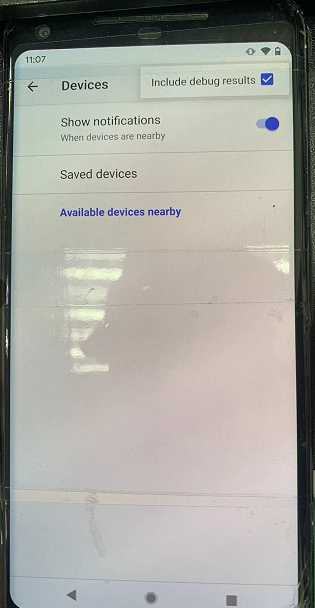
or
Settings \> Google \> Devices & sharing \> Devices \>“Include debug results”
https://developer.android.com/studio/debug/dev-options?hl=zh-cn
#### 1.10 Check Google Play Service version
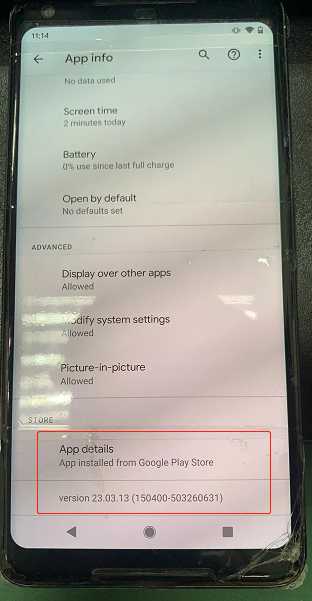
Purpose: To confirm we use right version of Fast Pair module for testing
Go to Settings \> Apps¬ification or Apps\>google play services \> advanced, then check Google Play services version (It should be 20.XX.XX or higher).
\
\
#### **1.11 注册成为google beta tester(内部测试账号已经注册过了,这一步不需要,如果是客户自己注册的Google账号,需要提醒客户check)**
Sign up for the Google Play services beta program https://play.google.com/apps/testing/com.google.android.gms
join the Android Beta group at https://www.google.com/android/beta to get latest update via OTA
Finder/Find Hub testing program please Navigate to https://play.google.com/apps/testing/com.google.android.apps.adm
\
可以登陆Google账号之后在以下链接查看是否有添加成功:我的群组
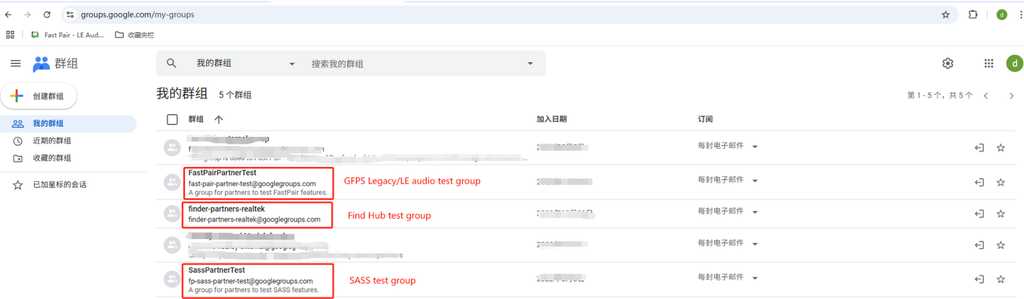
需要注意的是:
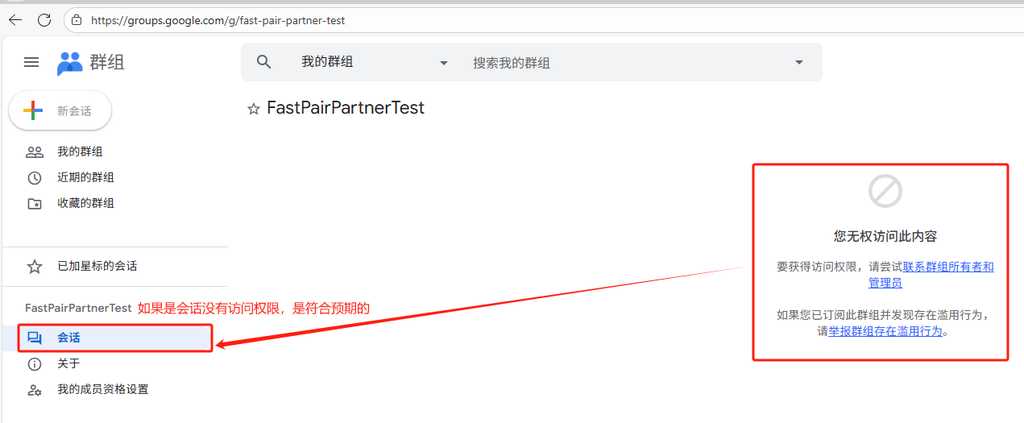
如果没有权限添加,FAE需要联系YingTsung (YT) Lin, 请他发邮件给Google, 让Google把客户注册的Google账号添加到Google的Test group。
### **2 Fast Pair Validator APP安装**
确认手机是否安装 Fast Pair Validator APP
Fast pair validator app 图标如下图:
如果没有安装:
去 Play Store/应用商店 下载 Fast Pair Validator APP并且安装。
如果已经安装:
确认安装的是否是最新版。不是最新版,请手动升级到最新版。确认步骤如下:
长按 Fast Pair Validator 图标,会看到App info
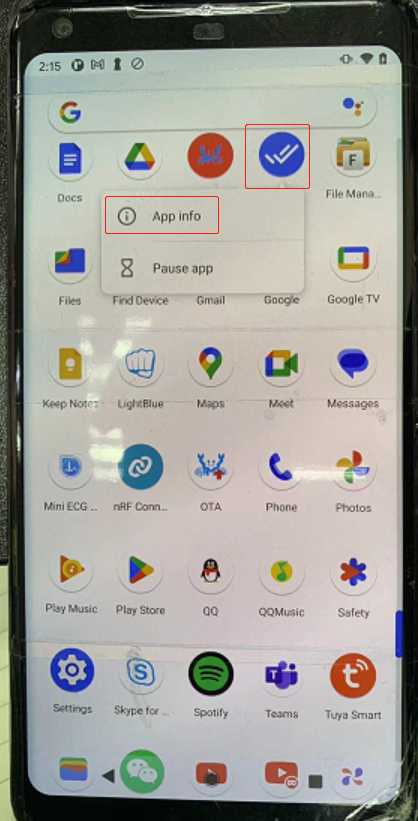
点击App info,会看到App details
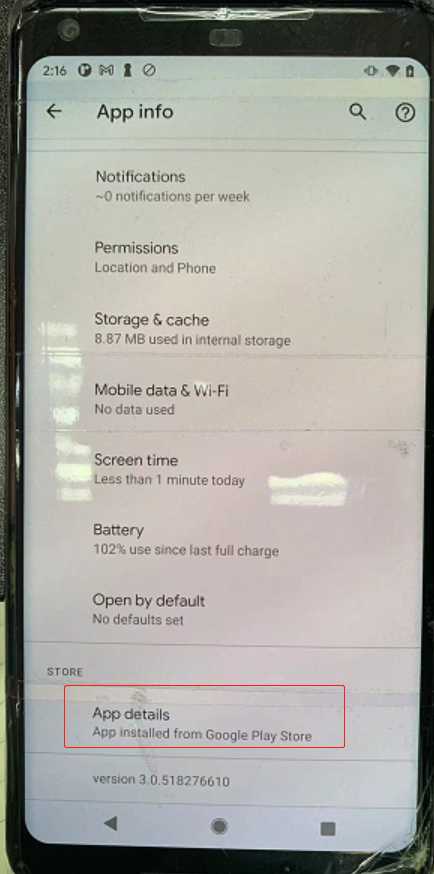
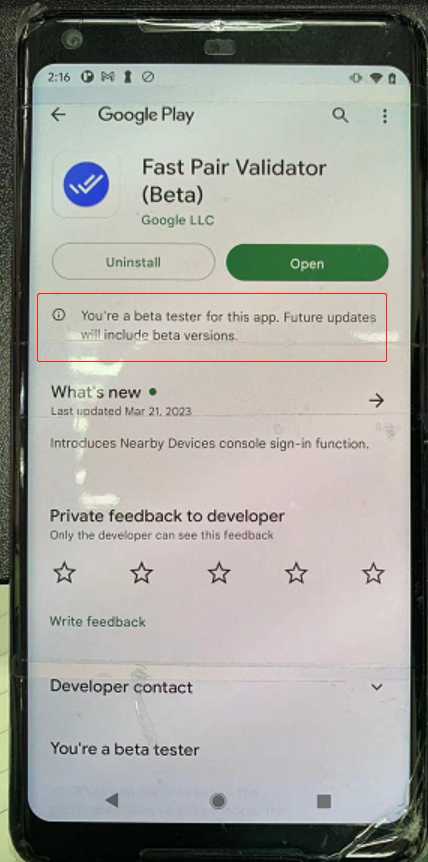
点击App details,会看到以下页面,如果有新版本请手动更新到最新的版本。如果是beta版本则不需要更新,系统会自动帮忙更新。
### 3 Enable fast pair validator app中的测项
#### 3.1 安装adb:
adb安装及使用方法 该wiki上提供的adb版本太旧,会出现device offline的问题,下载最新的https://adbshell.com/downloads
安装adb之后找到adb.exe所在的目录,在该目录下打开cmd命令行
#### 3.2 输入如下命令:
adb shell am broadcast -a com.google.location.nearby.apps.fastpair.validator.FLAG_OVERRIDE --es flag enable_features_for_v3 --es value true --es type boolean com.google.location.nearby.apps.fastpair.validator

按enter执行命令。
命令执行成功之后,
打开fast pair validator 能看到新的feature
\
### 4 uninstall amazon 相关app
Alexa (com.amazon.dee.app) 和com.amazon.wellness app, 会影响到Validator的测试,需要Uninstall。
The Alexa (com.amazon.dee.app) took too much time on handling the ACL_CONNECTED intent, which impacts the Validator's flow.
There is still another **app,com.amazon.wellness** app, who handled ACL_CONNECTED for 20+ seconds.Please uninstall it as well.
现象: End-to-end integration测试,出现Pairing timeout
操作方式:
adb uninstall com.amazon.wellness
adb uninstall com.amazon.dee.app
\
### 5 测试账号和MODEL ID
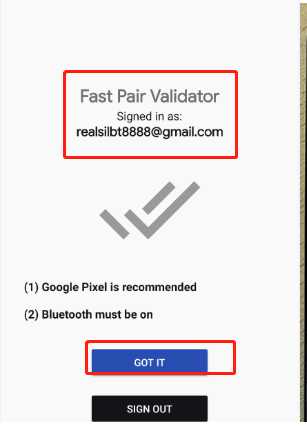
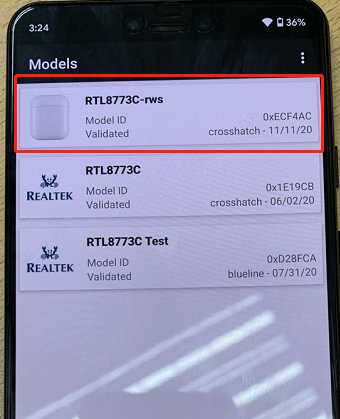
使用Fast Pair Validator测试,需要先登陆Google账号,测试设备使用的Model ID,public key, private key 必须是该google账号注册的Device。
场内测试账号:realsilbt8888@gmail.com
**Note:**
fast pair validator app使用的model id 要和DUT开发板配置的model id一致。
### **6 测试准备**
测试过程中需要注意
手机端弹出配对提示框时不要手动点击,fast pair validator app会自己触发配对.
开始测试前,需要确认是否已经和待测试耳机配对过,需要删除配对信息。 最后最好在开始测试前,开关一下飞行模式。
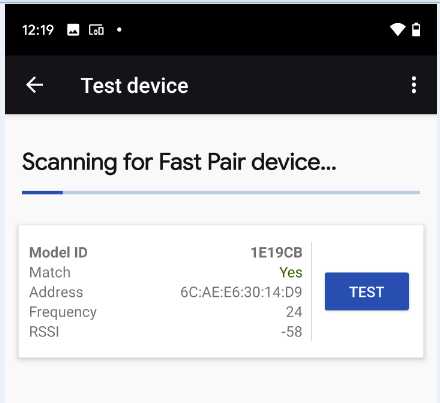
点击GOT IT开始测试时,耳机端一定要处于Pairable mode,否则会scan不到设备, scan 到设备后,点击Test开始测试。
### 7 Find hub 环境搭建:
#### **1.认证实验室会重新跑 fast pair validator中finder相关的测项,所以送认证前最好提供各个测项的操作视频以及详细的操作步骤(如何开机,如何factory reset,如何进pairing mode..)**
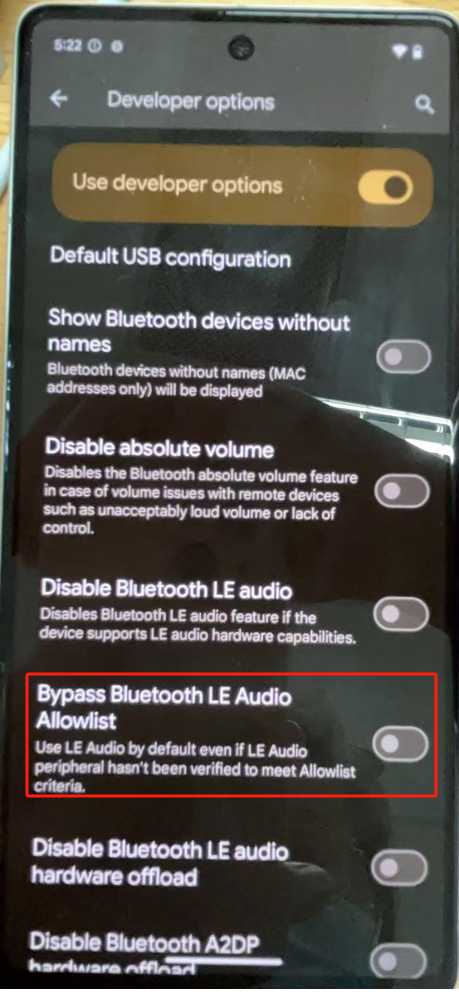
#### **2.如果测试手机支援LEA, 开发者选项中将 Bypass Bluetooth LE Audio 选项关掉,然后重启手机**
****
#### **3.一定要等所有的测项都测试PASS之后才可以提交测试结果**
如果存在Fail的测项,不可以提交测试结果!!!
如果存在Fail的测项,不可以提交测试结果!!!
如果存在Fail的测项,不可以提交测试结果!!!
#### 4. Fast pair validator enable EDDYSTONE:
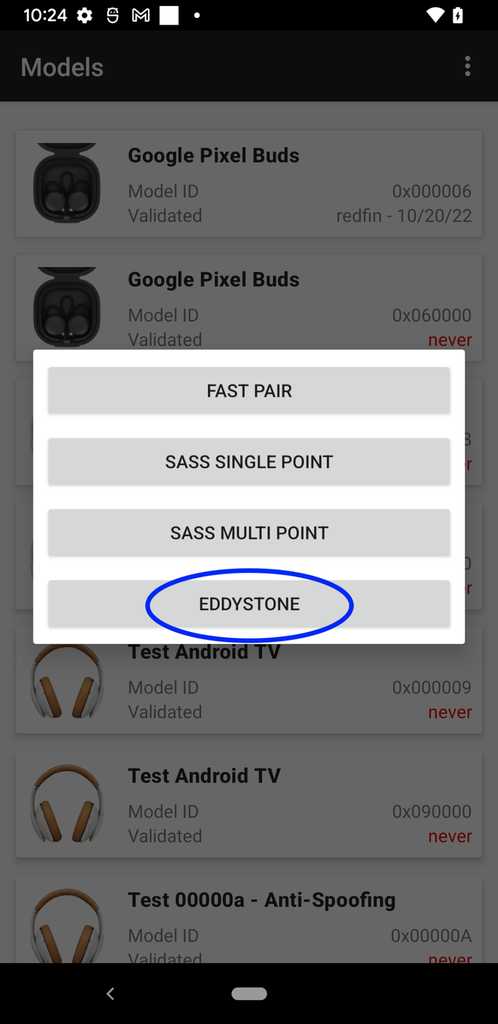
##### 1.打开fast pair validator, 登陆Google账号,找到和耳机对应的model id,点击model id之后会看到EDDYSTONE, 点击进行测试
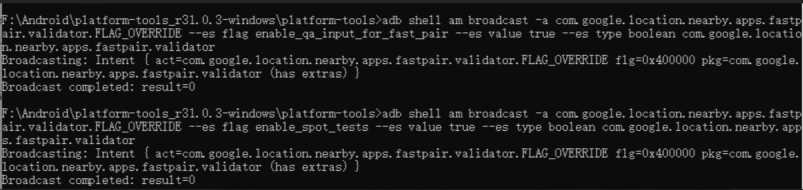
##### 2.如果看不到 EDDYSTONE, 需要 adb 执行以下两个commands:
cmd1:
adb shell am broadcast -a com.google.location.nearby.apps.fastpair.validator.FLAG_OVERRIDE --es flag enable_qa_input_for_fast_pair --es value true --es type boolean com.google.location.nearby.apps.fastpair.validator
cmd2:
adb shell am broadcast -a com.google.location.nearby.apps.fastpair.validator.FLAG_OVERRIDE --es flag enable_spot_tests --es value true --es type boolean com.google.location.nearby.apps.fastpair.validator
log信息如下:
\
##### 3 For locator tags that don't create a bond during pairing, also run the following command:
cmd3:
```
adb shell am broadcast -a com.google.location.nearby.apps.fastpair.validator.FLAG_OVERRIDE --es flag skip_bonding_for_spot_locator_tags --es value true --es type boolean com.google.location.nearby.apps.fastpair.validator
```
##### 3.然后选择EDDYSTONE 进行测试:
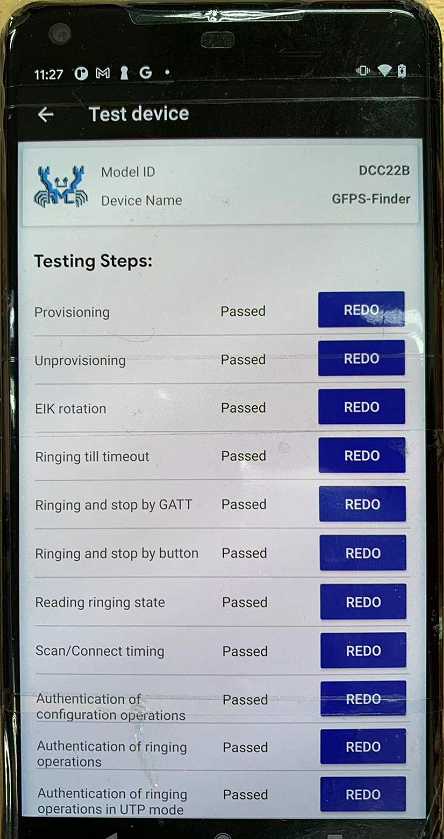
##### 4.Finder Fast Pair Validator EDDYSTONE测试完成。测试结果提交:\

 \
\

 测试jira:
BTQCSZ-6106 - Getting issue details... STATUS
\
测试jira:
BTQCSZ-6106 - Getting issue details... STATUS
\

 \
\

