# 1.3.1.1 FAST PAIR
- [Note](#id-1.3.1.1FASTPAIR-Note)
- [1 以下关于mcu cfg tool 的修改仅仅是为了通过fast pair validator测试,待测试通过之后,需要将相应的修改恢复默认值。否则GFPS功能没法正常使用。](#id-1.3.1.1FASTPAIR-1以下关于mcucfgtool的修改仅仅是为了通过fastpairvalidator测试,待测试通过之后,需要将相应的修改恢复默认值。否则GFPS功能没法正常使用。)
- [2 测试过程中GFPS 弹窗出来之后请不要点击弹窗!!!](#id-1.3.1.1FASTPAIR-2测试过程中GFPS弹窗出来之后请不要点击弹窗!!!)
- [3 GFPS Fast pair validator 测试走的Legacy flow, 通过gfps配对 legacy BREDR.](#id-1.3.1.1FASTPAIR-3GFPSFastpairvalidator测试走的Legacyflow,通过gfps配对legacyBREDR.)
- [4 mcu cfg tool 中 可以配置按键key1进入legacy Pairing mode(MMI 0x6C),有些测试会需要短按key1进入Pairing mode](#id-1.3.1.1FASTPAIR-4mcucfgtool中可以配置按键key1进入legacyPairingmode(MMI0x6C),有些测试会需要短按key1进入Pairingmode)
- [5 手机提示信息解读:](#id-1.3.1.1FASTPAIR-5手机提示信息解读:)
- [Upair the device:耳机做factory reset清掉配对信息](#id-1.3.1.1FASTPAIR-Upairthedevice:耳机做factoryreset清掉配对信息)
- [place the device back into pairing mode:耳机进入pairing mode](#id-1.3.1.1FASTPAIR-placethedevicebackintopairingmode:耳机进入pairingmode)
- [6 测试准备](#id-1.3.1.1FASTPAIR-6测试准备)
- [打开Fast Pair Validator app](#id-1.3.1.1FASTPAIR-打开FastPairValidatorapp)
- [通过model id找到待测试设备](#id-1.3.1.1FASTPAIR-通过modelid找到待测试设备)
- [选择FAST PAIR进行测试](#id-1.3.1.1FASTPAIR-选择FASTPAIR进行测试)
- [不要Enable LE spec test](#id-1.3.1.1FASTPAIR-不要EnableLEspectest)
- [Calibration 测试](#id-1.3.1.1FASTPAIR-Calibration测试)
- [End-to-end integration 测试](#id-1.3.1.1FASTPAIR-End-to-endintegration测试)
- [Auto pairing 测试](#id-1.3.1.1FASTPAIR-Autopairing测试)
- [Auto Subsequent Pairing 测试](#id-1.3.1.1FASTPAIR-AutoSubsequentPairing测试)
- [Cross Seekers Auto Subsequent Pairing Test 测试](#id-1.3.1.1FASTPAIR-CrossSeekersAutoSubsequentPairingTest测试)
- [Public Key Based Pairing Request in Non Discoverable Mode 测试](#id-1.3.1.1FASTPAIR-PublicKeyBasedPairingRequestinNonDiscoverableMode测试)
- [Public Key Based Pairing Request After Retroactive Pair 测试](#id-1.3.1.1FASTPAIR-PublicKeyBasedPairingRequestAfterRetroactivePair测试)
- [Account key Broadcasting & Rotation of RPA测试](#id-1.3.1.1FASTPAIR-AccountkeyBroadcasting&RotationofRPA测试)
- [Key Based Request Flags Reserved Bit Verification 测试](#id-1.3.1.1FASTPAIR-KeyBasedRequestFlagsReservedBitVerification测试)
- [Distance 0.3 Meter 测试](#id-1.3.1.1FASTPAIR-Distance0.3Meter测试)
- [](#id-1.3.1.1FASTPAIR-)
- [Distance 1.2 Meter 测试](#id-1.3.1.1FASTPAIR-Distance1.2Meter测试)
- [Distance 2 Meter 测试](#id-1.3.1.1FASTPAIR-Distance2Meter测试)
- [Battery Notification Verification 测试](#id-1.3.1.1FASTPAIR-BatteryNotificationVerification测试)
- [Battery Suppress Notification Verification 测试](#id-1.3.1.1FASTPAIR-BatterySuppressNotificationVerification测试)
- [Battery Level Update Verification 测试](#id-1.3.1.1FASTPAIR-BatteryLevelUpdateVerification测试)
- [Personalized Name Update 测试](#id-1.3.1.1FASTPAIR-PersonalizedNameUpdate测试)
- [Personalized Name with Provider First Time Pairing 测试](#id-1.3.1.1FASTPAIR-PersonalizedNamewithProviderFirstTimePairing测试)
- [Ring a Device 测试](#id-1.3.1.1FASTPAIR-RingaDevice测试)
- [Retroactive Pair 测试](#id-1.3.1.1FASTPAIR-RetroactivePair测试)
- [Active Noise Control Verification 测试](#id-1.3.1.1FASTPAIR-ActiveNoiseControlVerification测试)
- [Active Noise Control Disable 测试](#id-1.3.1.1FASTPAIR-ActiveNoiseControlDisable测试)
- [Firmware Version 测试](#id-1.3.1.1FASTPAIR-FirmwareVersion测试)
- [Dynamic Buffer Size测试](#id-1.3.1.1FASTPAIR-DynamicBufferSize测试)
- [10.测试结果上报](#id-1.3.1.1FASTPAIR-10.测试结果上报)
### **Note**
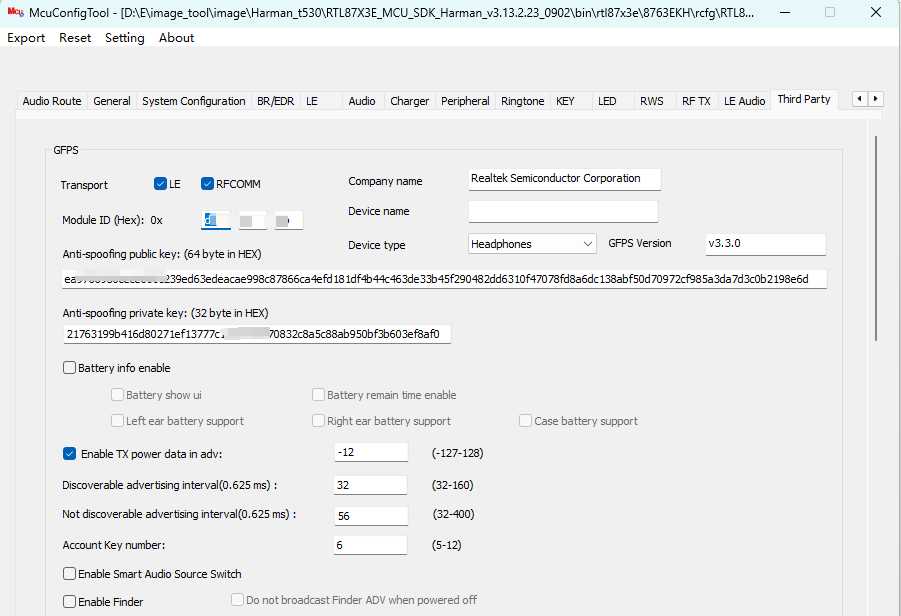
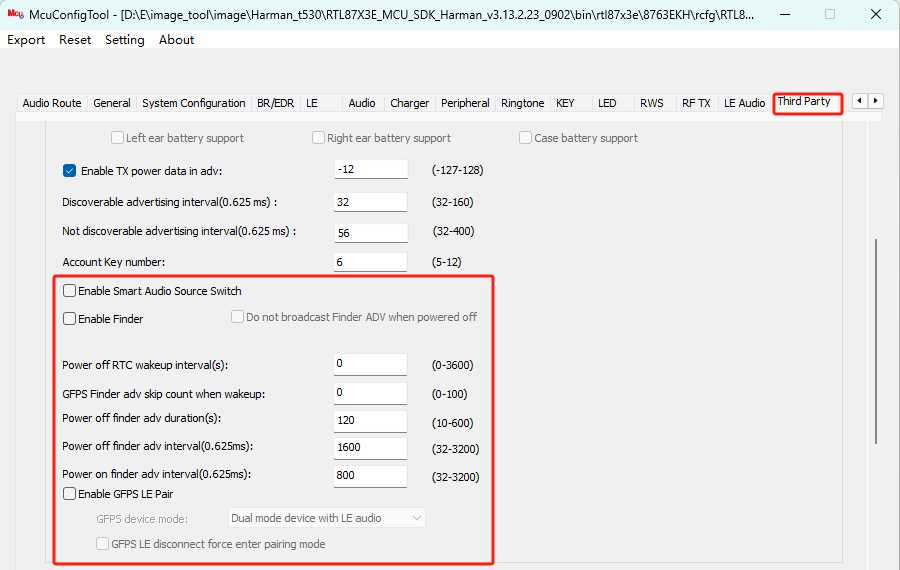
#### 1 以下关于mcu cfg tool 的修改仅仅是为了通过fast pair validator测试,待测试通过之后,需要将相应的修改恢复默认值。否则GFPS功能没法正常使用。
也就是说以下修改只能搭配fast pair validator app使用,请不要将对应的修改提交到正式release版本。
#### 2 测试过程中GFPS 弹窗出来之后请不要点击弹窗!!!
#### 3 GFPS Fast pair validator 测试走的Legacy flow, 通过gfps配对 legacy BREDR.
#### 4 mcu cfg tool 中 可以配置按键key1进入legacy Pairing mode(MMI 0x6C),有些测试会需要短按key1进入Pairing mode
\
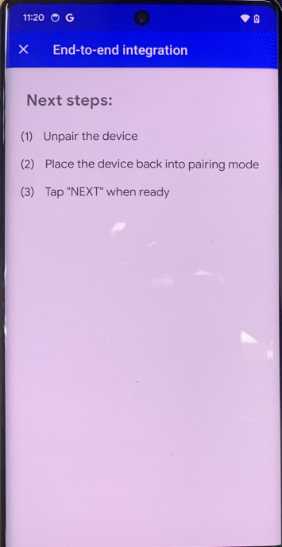
#### 5 手机提示信息解读:
##### Upair the device:耳机做factory reset清掉配对信息
##### place the device back into pairing mode:耳机进入pairing mode
#### 6 测试准备
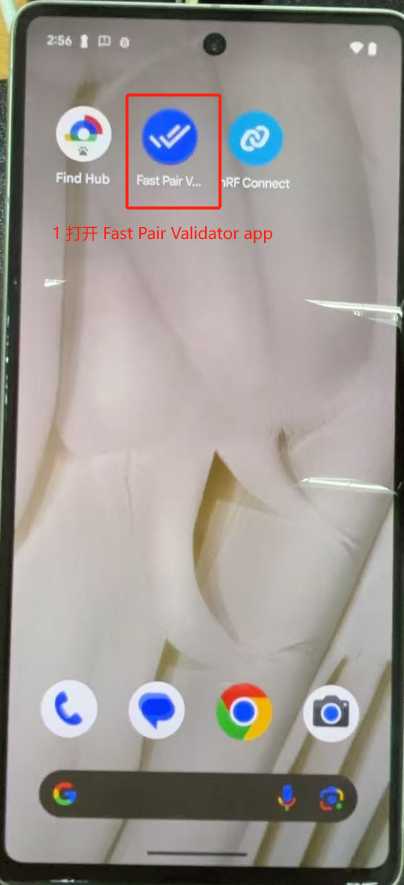
##### 打开Fast Pair Validator app
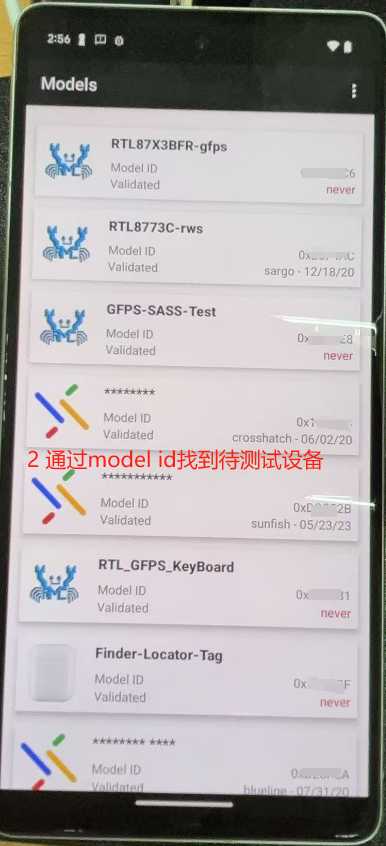
##### 通过model id找到待测试设备
##### 选择FAST PAIR进行测试
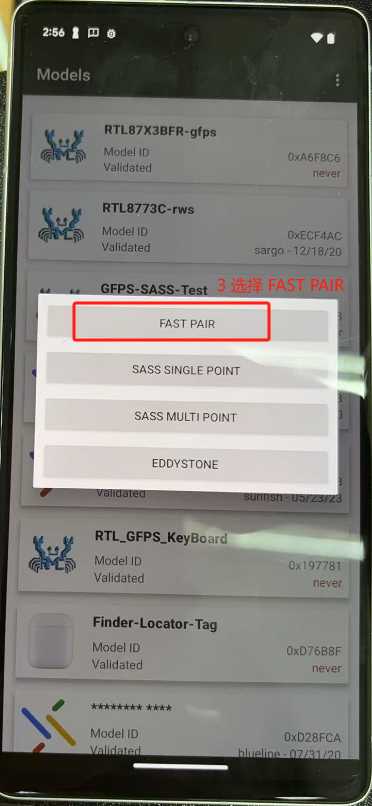
##### 不要Enable LE spec test
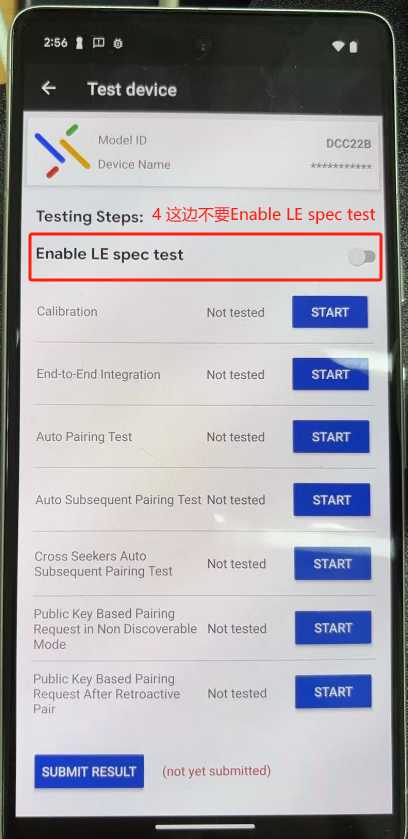
### Calibration 测试
Note:
calibration 测试, discoverable adv interval需要足够小,spec 规定 discoverable mode adv \<= 100ms,mcu cfg tool目前设为32(20 ms) 可以测试通过。
开机legacy进pairing mode后,按键key1进入GFPS LEA 配对模式,按app提示将手机放置离耳机 1m、3m、0.3m米处,等待测试完成。
Note:
GFPS 弹窗出来之后请**不要**点击弹窗!!!
如果1m测项测试失败,Fast pair validator可以协助我们手动调整tx power值:
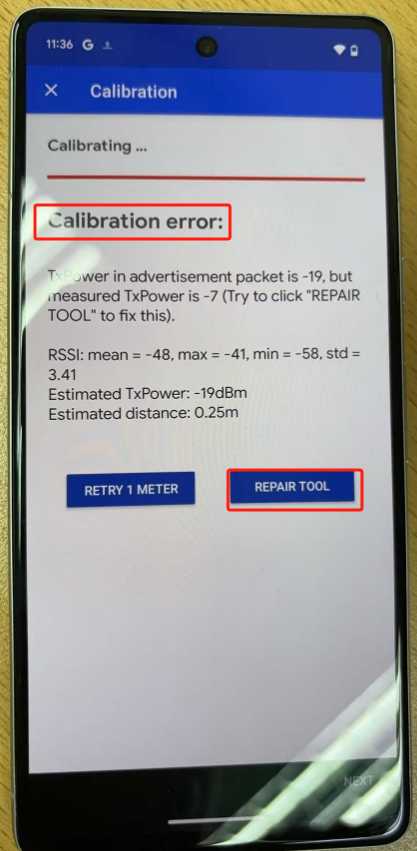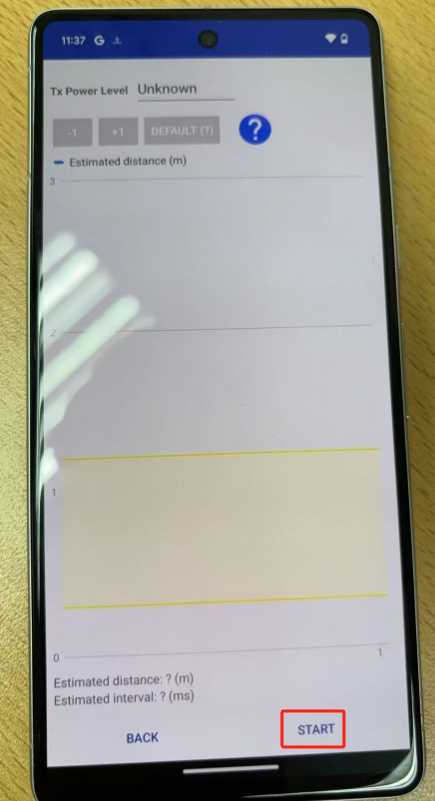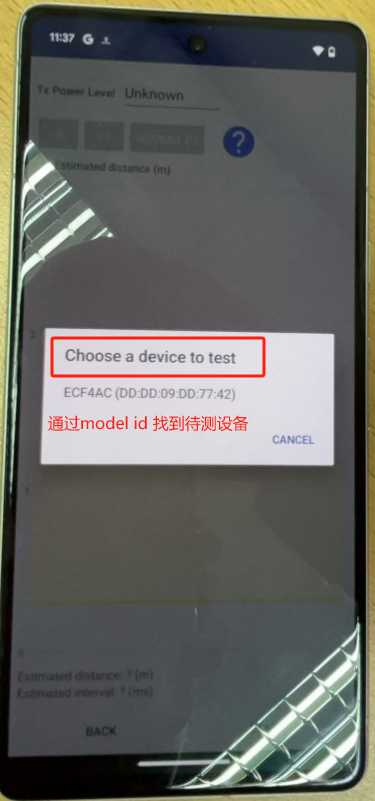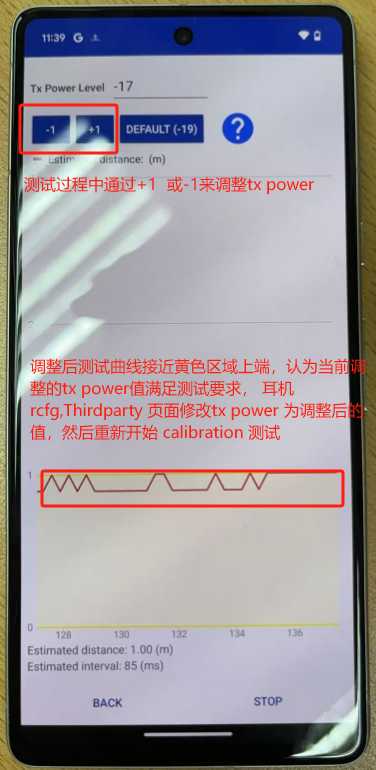
详细文档可以参考:tx power adjust user guide - BT_Market - WIKI
### End-to-end integration 测试
Note:
spec 规定not discoverable mode adv interval \<= 250ms,该测项中有verify 500ms frequency检查,超过500 会fail,目前设置成62.5ms可以通过测试。
\
MCU cfg tool 配置:
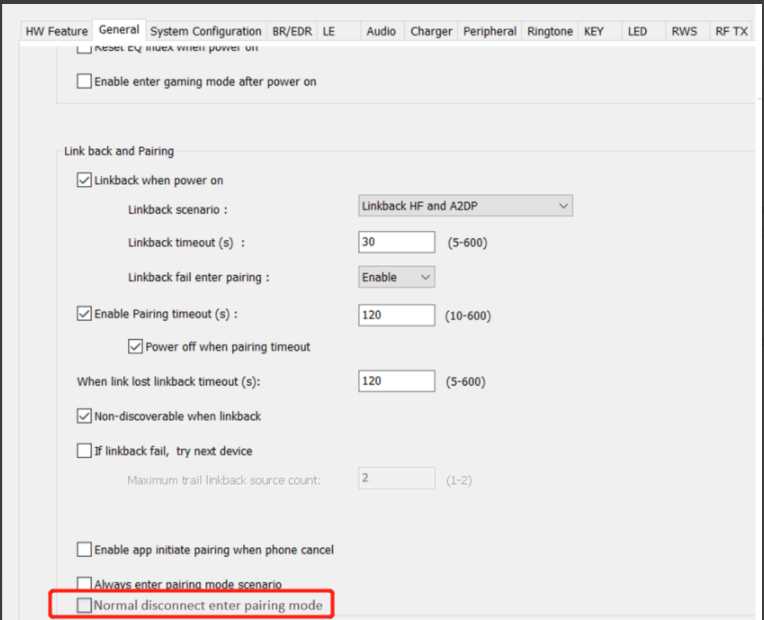
测试该测项的时候,手机清除配对信息(unpair device),DUT断线需要进入non discoverable mode, 所以mcu config tool 中rws normal disconnect enter pairing mode需要设置成disable(不勾选)。
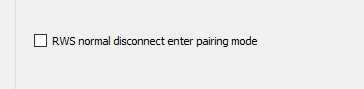
如果找不到 rws normal disconnect enter pairing mode 这个配置项 ,原因是这个配置项挪位置了,请参考jira BTSOCTOOL-2822 - Getting issue details... STATUS 进行配置,RWS normal disconnect enter pairing mode 改成Normal disconnect enter pairing mode
\
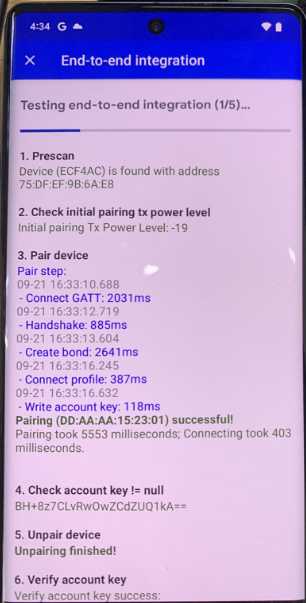
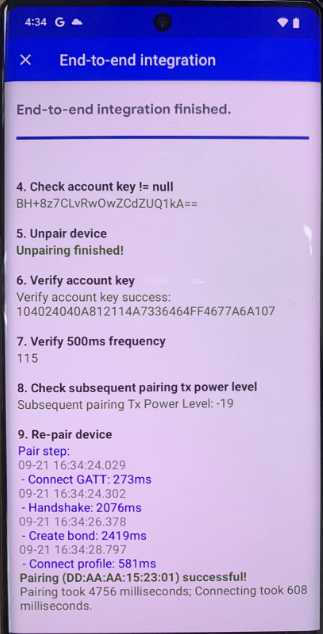
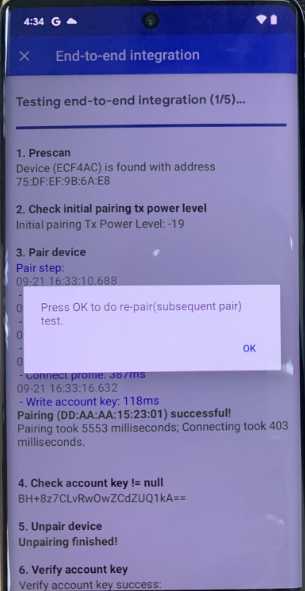
(1)手机提示 Next steps时,控制耳机进入配对模式,点击next,等待手机 prescan-\> pair device -\> check account key != null -\> unpair device-\>verify account key –\> verify 500ms frequency -\> Check subsequent pairing tx power level -\> repair device -\> un-repair device.。
(2)点击next。 注意一定要在“10.Un-Repair device”显示“Unpairing finished!”后才能点NEXT。
如此反复5遍。
测试视频:
End To End test.mp4
### Auto pairing 测试
Mcu cfg tool配置:
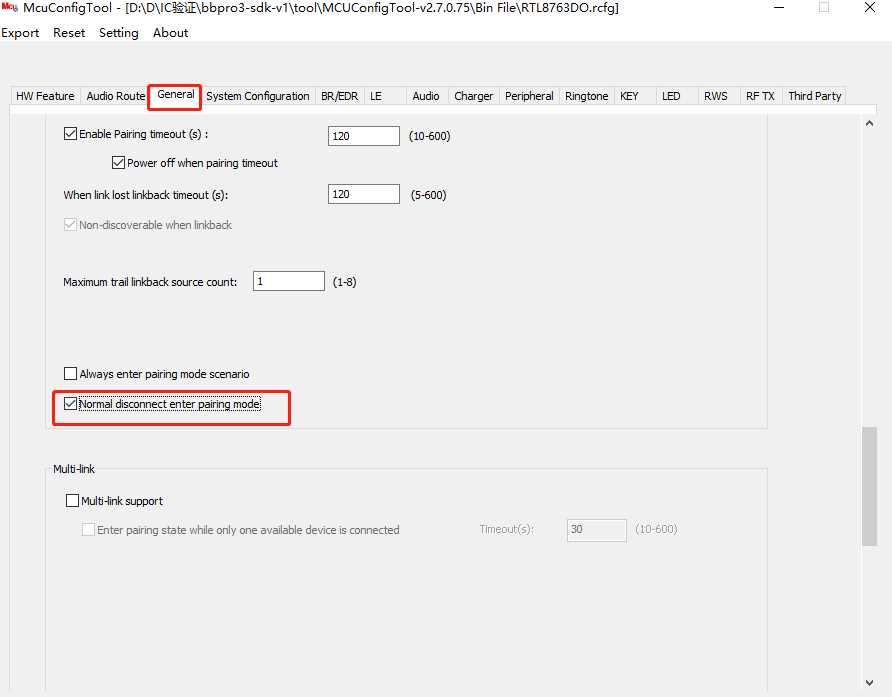
测试该测项的时候,手机清除配对信息(unpair device),DUT断线需要进入discoverable mode, 所以mcu config tool 中 RWS页面下 rws normal disconnect enter pairing mode需要设置成enable(勾选)。\
app_cfg_const.rws_disconnect_enter_pairing
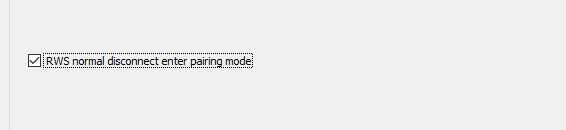
如果找不到 rws normal disconnect enter pairing mode 这个配置项 ,原因是这个配置项挪位置了,请参考jira BTSOCTOOL-2822 - Getting issue details... STATUS 进行配置,RWS normal disconnect enter pairing mode 改成Normal disconnect enter pairing mode
\
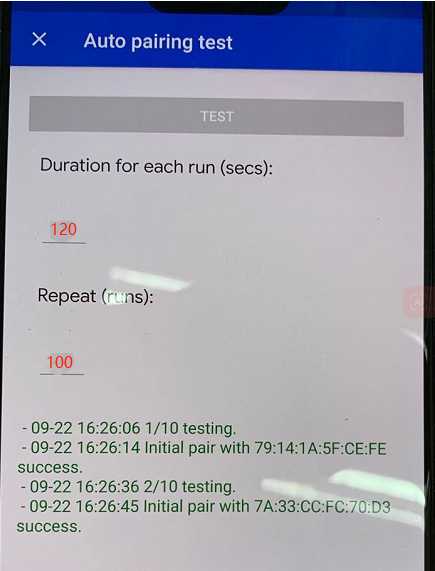
设置每一轮测试持续时间以及重复进行多少轮测试(推荐使用APP中提供的默认值进行测试(100次,一次120s),然后点击test,
测试时将手机setting-》显示-》屏幕超时设置成最大值。灭屏之后测试好像会stop,所以屏幕要保持常亮的状态。
\
**Note:**
这个测试按照Google的测试spec是要求每轮测试之前都要强制进pairing mode的。
正常每轮测试结束后手机会主动断线,为了方便测试我们soc端有设置只要soc收到手机主动断线的指令之后就会主动进入pairing mode,等待下一轮测试。
因为是跑测试,我们soc端没办法预测所有的失败场景,所以针对异常的情况,soc端是没办法做到所有的失败场景下都能保证下一轮测试一定会正常进pairing mode, 因为手机端并不会告诉soc 什么时候测试开始。
所以如果跑自动化测试遇到失败的情况,建议手动测试, 每一轮测试结束之后根据提示让设备主动进入pairing mode。
\
### Auto Subsequent Pairing 测试
MCU cfg tool 配置:
测试该测项的时候,手机清除配对信息(unpair device),DUT断线需要进入non discoverable mode, 所以mcu config tool 中rws normal disconnect enter pairing mode需要设置成disable(不勾选)。

如果找不到 rws normal disconnect enter pairing mode 这个配置项 ,原因是这个配置项挪位置了,请参考jira BTSOCTOOL-2822 - Getting issue details... STATUS 进行配置,RWS normal disconnect enter pairing mode 改成Normal disconnect enter pairing mode

\
**Note:**
这个测试按照Google的测试spec是要求每轮测试之前都要打nondiscoverable 广播的。
正常每轮测试结束后手机会主动断线,为了方便测试我们soc端有设置只要soc收到手机主动断线的指令之后就会主动打nondiscoverable 广播,等待下一轮测试。
因为是跑测试,
我们soc端没办法预测所有的失败场景,
所以针对异常的情况,
soc端是没办法做到所有的失败场景下都能保证下一轮测试一定会主动打nondiscoverable 广播(不在pairing mode才会打nondiscoverable 广播), 因为手机端并不会告诉soc 什么时候测试开始。
所以如果跑自动化测试遇到失败的情况,建议手动测试:
每一轮测试结束之后EVB按一下reset或者是关机再开机让设备端主动打nondiscoverable 广播(注意这个时候EVB一定不能做factory reset,也不能进pairing mode, 因为这个时候是期望打 nondiscoverable 广播)
BLE advertisements don't contain fast pair account key while not in pairing mode 如果频繁遇到这个error, 可以尝试手动测试试试看
\
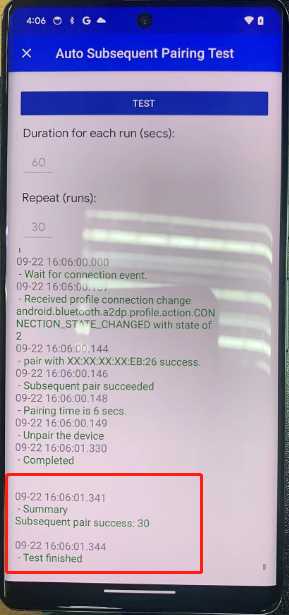
测试信息设置:
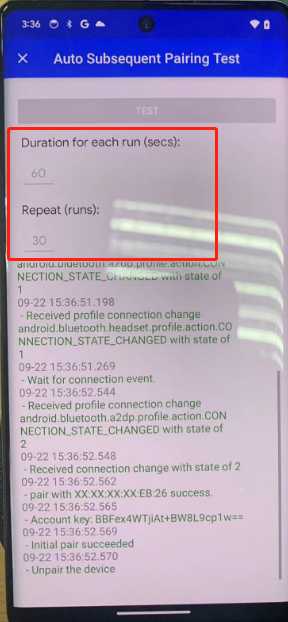
手机端测试信息设置完成之后,
耳机先做factory reset,之后耳机开机进pairing mode,
之后手机端点击test 开始测试
\
\
### Cross Seekers Auto Subsequent Pairing Test 测试
MCU cfg tool 配置:
测试该测项的时候,手机清除配对信息(unpair device),DUT断线需要进入non discoverable mode, 所以mcu config tool 中rws normal disconnect enter pairing mode需要设置成disable(不勾选)。

如果找不到 rws normal disconnect enter pairing mode 这个配置项 ,原因是这个配置项挪位置了,请参考jira BTSOCTOOL-2822 - Getting issue details... STATUS 进行配置,RWS normal disconnect enter pairing mode 改成Normal disconnect enter pairing mode

\
\
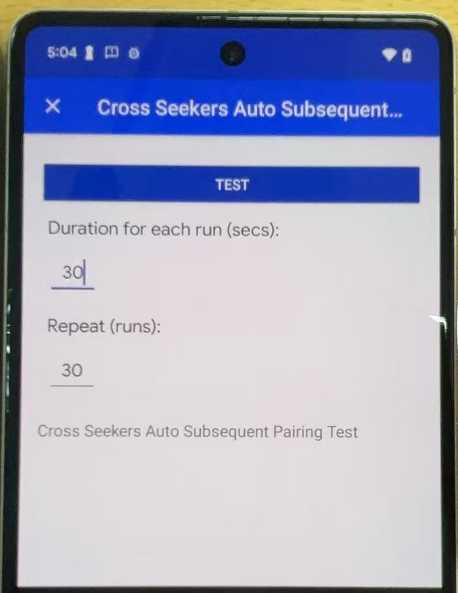
测试信息设置:
\
耳机先做factory reset,手机端清掉配对信息1 gfps/finder 如何清除配对信息 - BT_Market - WIKI, 之后耳机开机进pairing mode,之后手机端点击test 开始测试
\
测试视频:
Cross Seekers Auto Subsequent Pairing Test.mp4
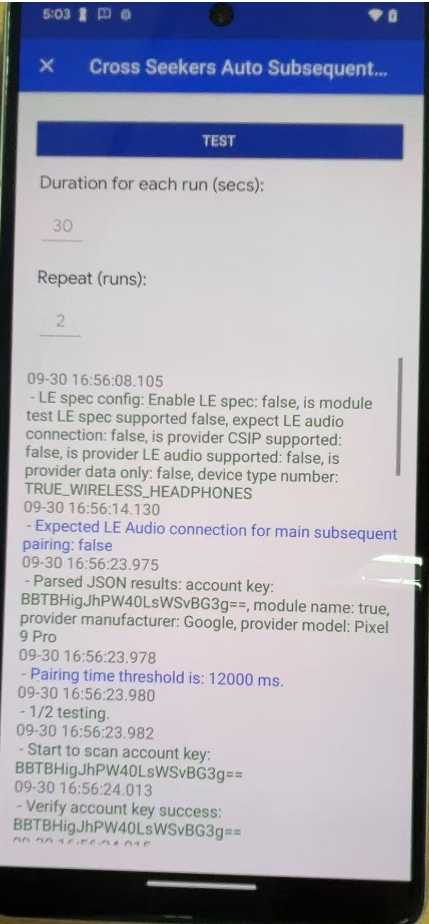
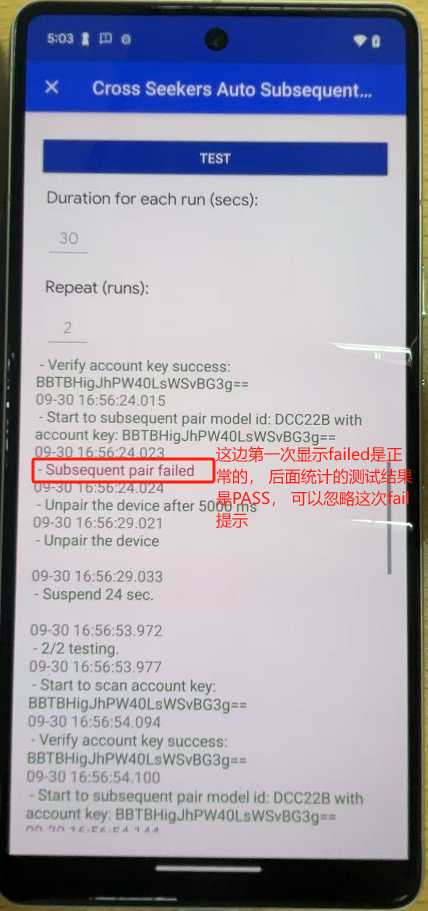
测试log:
COM12_2025-09-30_16-56-51.log
COM12_btsnoop_2025-09-30_16-51-45.cfa
COM12_2025-09-30_16-51-39.log
COM12_2025-09-26_14-19-00.log
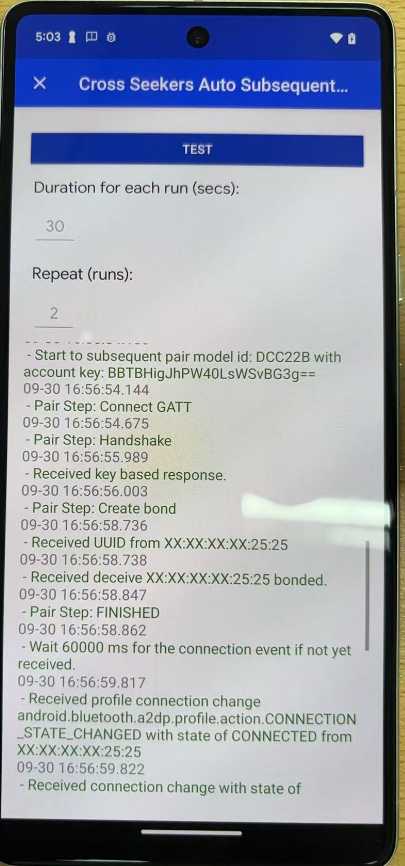
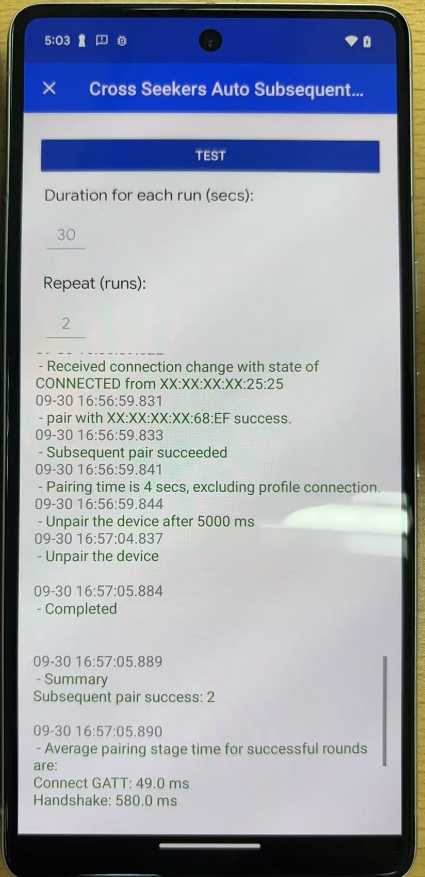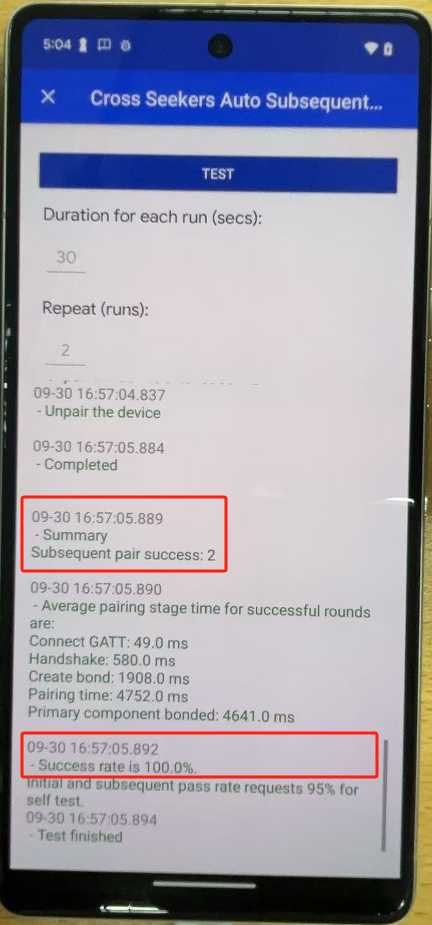
\
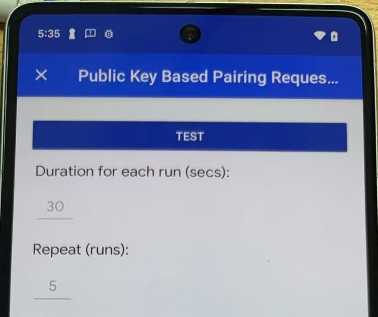
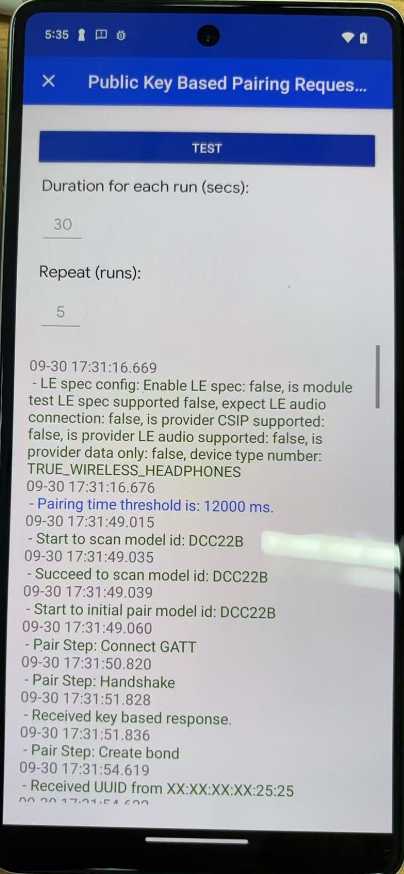
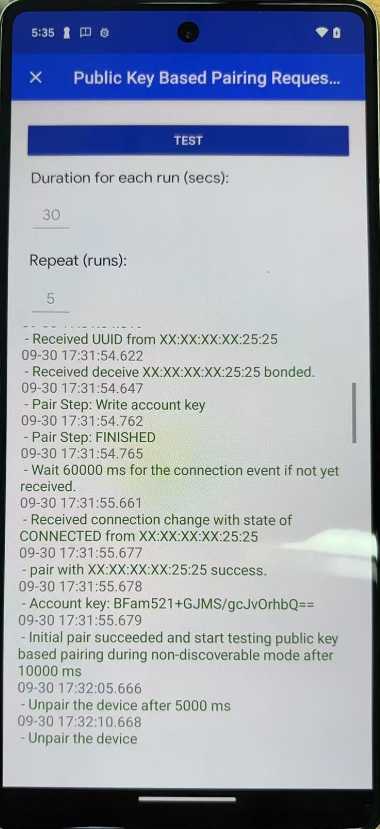
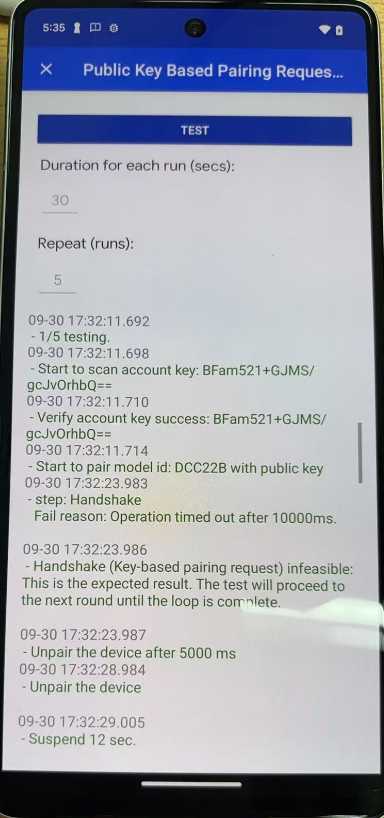
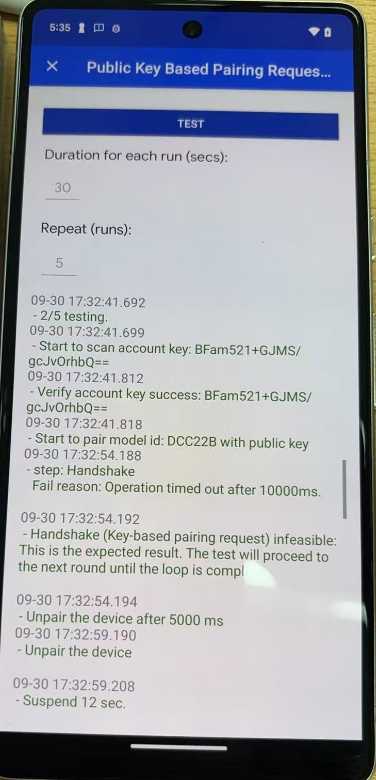
### Public Key Based Pairing Request in Non Discoverable Mode 测试
MCU cfg tool 配置:
测试该测项的时候,手机清除配对信息(unpair device),DUT断线需要进入non discoverable mode, 所以mcu config tool 中rws normal disconnect enter pairing mode需要设置成disable(不勾选)。

如果找不到 rws normal disconnect enter pairing mode 这个配置项 ,原因是这个配置项挪位置了,请参考jira BTSOCTOOL-2822 - Getting issue details... STATUS 进行配置,RWS normal disconnect enter pairing mode 改成Normal disconnect enter pairing mode

\
\
测试信息设置:
\
耳机先做factory reset,手机端清掉配对信息1 gfps/finder 如何清除配对信息 - BT_Market - WIKI, 之后耳机开机进pairing mode,之后手机端点击test 开始测试
\
测试视频:
public key based request in non discoverable mode-Non LEA.mp4
测试log:
COM12_2025-09-30_17-33-58.log
COM12_btsnoop_2025-09-30_17-29-41.cfa
COM12_2025-09-30_17-29-39.log
\
### Public Key Based Pairing Request After Retroactive Pair 测试
MCU cfg tool 配置:
测试该测项的时候,手机清除配对信息(unpair device),DUT断线需要进入non discoverable mode, 所以mcu config tool 中rws normal disconnect enter pairing mode需要设置成disable(不勾选)。

如果找不到 rws normal disconnect enter pairing mode 这个配置项 ,原因是这个配置项挪位置了,请参考jira BTSOCTOOL-2822 - Getting issue details... STATUS 进行配置,RWS normal disconnect enter pairing mode 改成Normal disconnect enter pairing mode

\
\
测试信息设置:
耳机先做factory reset,手机端清掉配对信息1 gfps/finder 如何清除配对信息 - BT_Market - WIKI, 之后耳机开机进pairing mode,之后手机端点击test 开始测试
\
测试视频:
如果测试过程中遇到 Get account key fail, 参考以下视频:
Public key based pairing request after retroactive pair-nonLEA-Get account key fail.mp4
测试成功视频:
Public key based pairing request after retroactive pair-nonLEA.mp4
\
测试log:
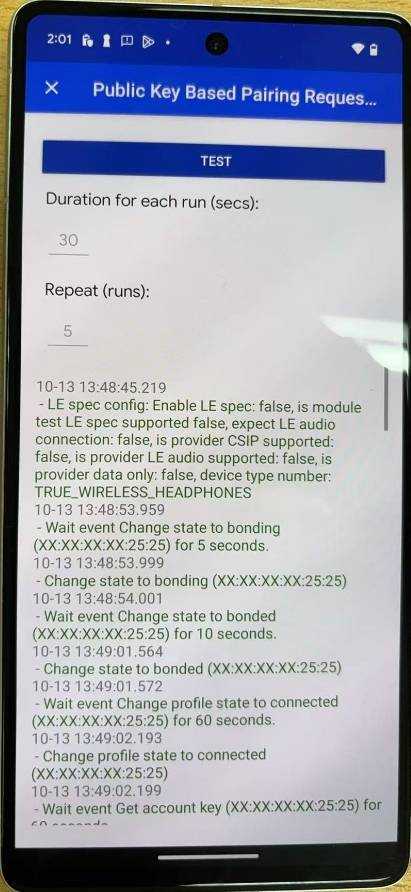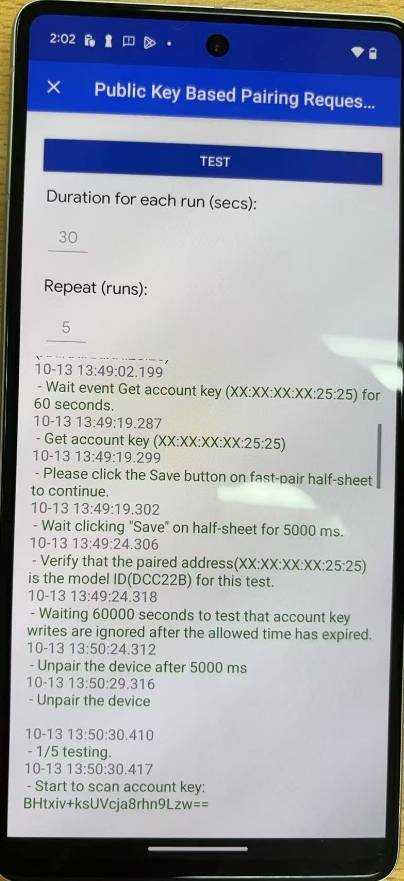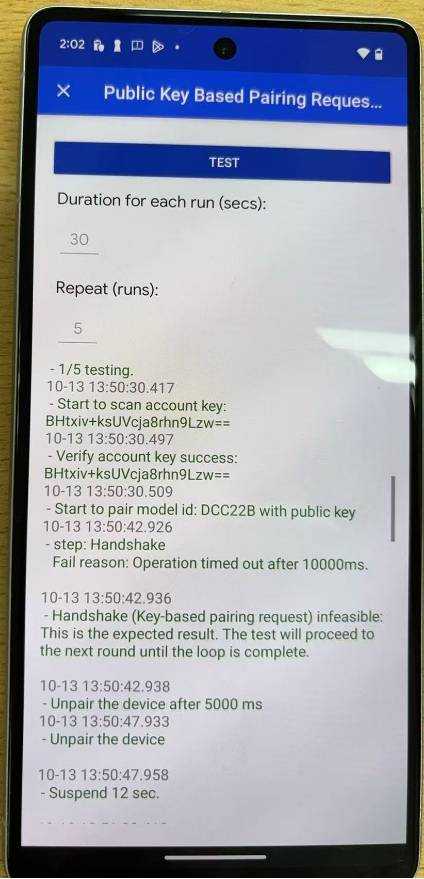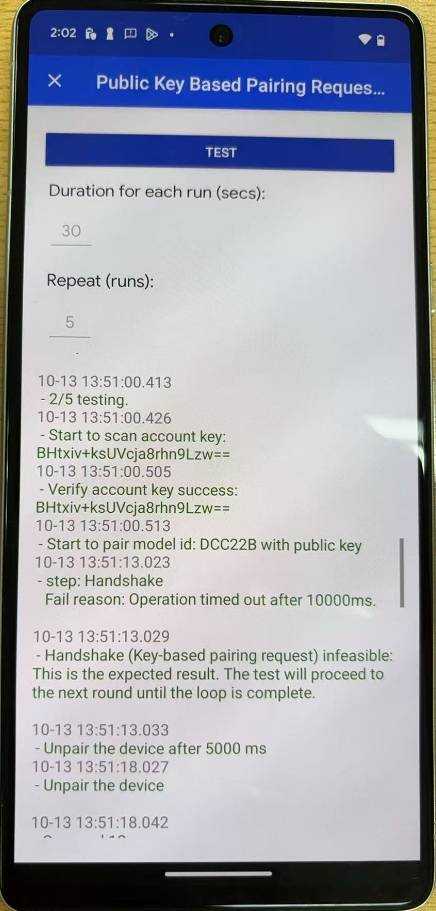
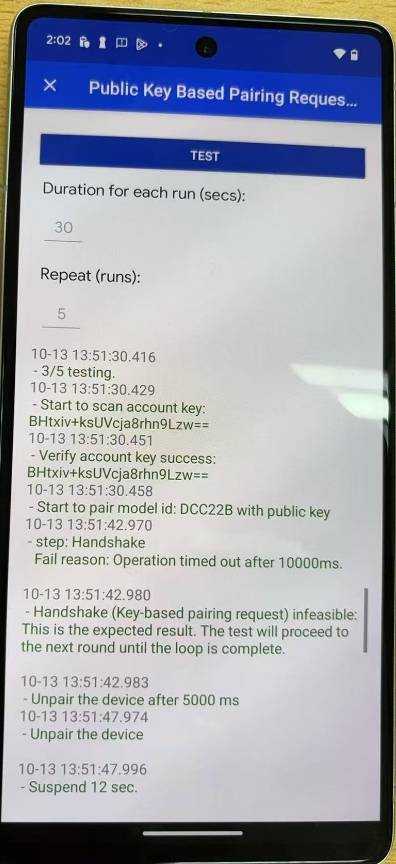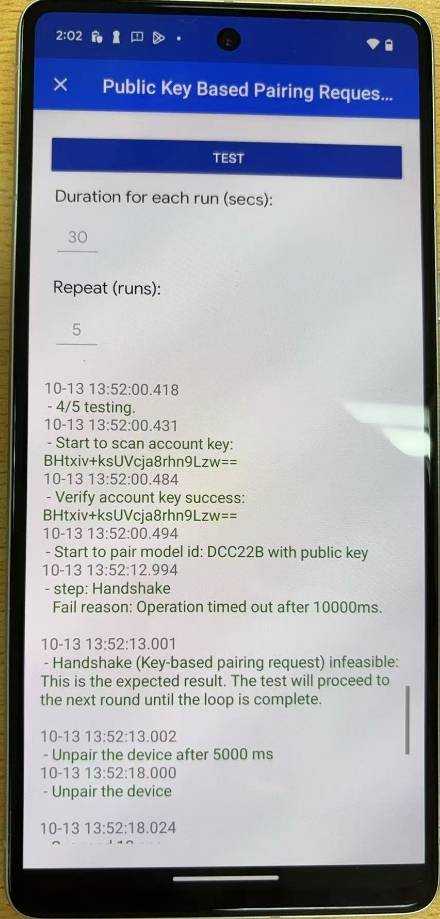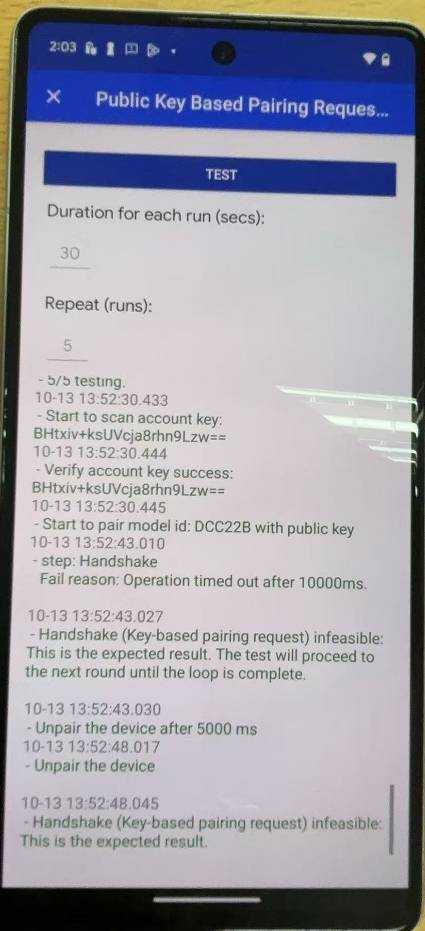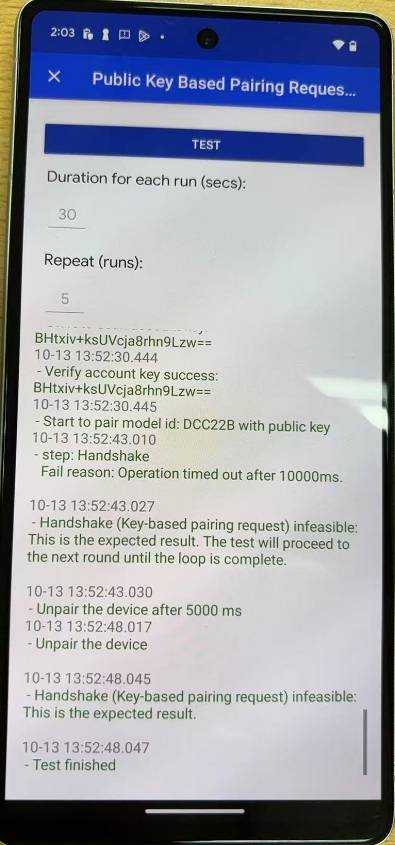
COM12_2025-10-13_13-47-37.log
COM12_2025-10-13_13-51-37.log
COM12_btsnoop_2025-10-13_13-48-53.cfa
Public Key Based Pairing Request After Retroactive Pair测试pass.7z
### Account key Broadcasting & Rotation of RPA测试
MCU cfg tool 配置:
测试该测项的时候,手机清除配对信息(unpair device),DUT断线需要进入non discoverable mode, 所以mcu config tool 中rws normal disconnect enter pairing mode需要设置成disable(不勾选)。

如果找不到 rws normal disconnect enter pairing mode 这个配置项 ,原因是这个配置项挪位置了,请参考jira BTSOCTOOL-2822 - Getting issue details... STATUS 进行配置,RWS normal disconnect enter pairing mode 改成Normal disconnect enter pairing mode

\
板子做factory reset之后,开机进pairing mode,点击test开始测试, 测试时间大概30min左右

\
### Key Based Request Flags Reserved Bit Verification 测试
MCU cfg tool 配置:
测试该测项的时候,手机清除配对信息(unpair device),DUT断线需要进入non discoverable mode, 所以mcu config tool 中rws normal disconnect enter pairing mode需要设置成disable(不勾选)。

如果找不到 rws normal disconnect enter pairing mode 这个配置项 ,原因是这个配置项挪位置了,请参考jira BTSOCTOOL-2822 - Getting issue details... STATUS 进行配置,RWS normal disconnect enter pairing mode 改成Normal disconnect enter pairing mode

\
板子做factory reset之后,开机进pairing mode,点击test开始测试
测试过程中看到"Please places the headset to pairing mode"的时候,短按key1进入pairing mode, 测试过程中不可以做factory reset
测试视频:
Key Based Request Flags Reserved Bit Verification.mp4
\
### Distance 0.3 Meter 测试
耳机开机,按键key1进入GFPS LEA配对模式,然后开始测试,等待测试完成。
Note:
GFPS 弹窗出来之后不要点;
如果该测项测不过,MCU cfg tool Thirdparty 页面需要适当减小tx power(比如从-10,减小到-12);并重新跑 "**Calibration 测试"** 以及该测项
\
### 
\
### Distance 1.2 Meter 测试
耳机开机,按键key1进入GFPS LEA配对模式,然后开始测试,等待测试完成。
Note:
GFPS 弹窗出来之后不要点;
如果该测项测不过,MCU cfg tool Thirdparty 页面需要适当增大tx power(比如从-12增大到-10);并重新跑 "**Calibration 测试"** 以及该测项
\
\
### Distance 2 Meter 测试
耳机开机,按键key1进入GFPS LEA配对模式,然后开始测试,等待测试完成。
Note:
GFPS 弹窗出来之后不要点;
如果该测项测不过,MCU cfg tool Thirdparty 页面需要适当增大tx power(比如从-12增大到-10);并重新跑 "**Calibration 测试"** 以及该测项

\
\
\
### Battery Notification Verification 测试
Note:
该测项测试的时候需要接充电盒
MCU cfg tool 配置:
测试该测项的时候,手机清除配对信息(unpair device),DUT断线需要进入non discoverable mode, 所以mcu config tool 中rws normal disconnect enter pairing mode需要设置成disable(不勾选)。

如果找不到 rws normal disconnect enter pairing mode 这个配置项 ,原因是这个配置项挪位置了,请参考jira BTSOCTOOL-2822 - Getting issue details... STATUS 进行配置,RWS normal disconnect enter pairing mode 改成Normal disconnect enter pairing mode

\
测试前板子先做factory reset,之后再开机进pairing mode

\
### Battery Suppress Notification Verification 测试
Note:
该测项测试的时候需要接充电盒
MCU cfg tool 配置:
测试该测项的时候,手机清除配对信息(unpair device),DUT断线需要进入non discoverable mode, 所以mcu config tool 中rws normal disconnect enter pairing mode需要设置成disable(不勾选)。

如果找不到 rws normal disconnect enter pairing mode 这个配置项 ,原因是这个配置项挪位置了,请参考jira BTSOCTOOL-2822 - Getting issue details... STATUS 进行配置,RWS normal disconnect enter pairing mode 改成Normal disconnect enter pairing mode

\
测试前板子先做factory reset,之后再开机进pairing mode
\
### Battery Level Update Verification 测试
Note:
该测项测试的时候需要接充电盒
MCU cfg tool 配置:
测试该测项的时候,手机清除配对信息(unpair device),DUT断线需要进入non discoverable mode, 所以mcu config tool 中rws normal disconnect enter pairing mode需要设置成disable(不勾选)。

如果找不到 rws normal disconnect enter pairing mode 这个配置项 ,原因是这个配置项挪位置了,请参考jira BTSOCTOOL-2822 - Getting issue details... STATUS 进行配置,RWS normal disconnect enter pairing mode 改成Normal disconnect enter pairing mode

\
测试前板子先做factory reset,之后再开机进pairing mode
\
### Personalized Name Update 测试
MCU cfg tool 配置:
测试该测项的时候,手机清除配对信息(unpair device),DUT断线需要进入non discoverable mode, 所以mcu config tool 中rws normal disconnect enter pairing mode需要设置成disable(不勾选)。

如果找不到 rws normal disconnect enter pairing mode 这个配置项 ,原因是这个配置项挪位置了,请参考jira BTSOCTOOL-2822 - Getting issue details... STATUS 进行配置,RWS normal disconnect enter pairing mode 改成Normal disconnect enter pairing mode

\
\
\
测试注意事项:
测试之前板子先做factory reset, 然后开机进pairing mode, 开始测试
测试过程中看到"Please places the headset to pairing mode"的时候,短按key1进入pairing mode, 测试过程中不可以做factory reset

\
测试log:

测试视频:
Personalized name update.mp4
### Personalized Name with Provider First Time Pairing 测试
MCU cfg tool 配置:
测试该测项的时候,手机清除配对信息(unpair device),DUT断线需要进入non discoverable mode, 所以mcu config tool 中rws normal disconnect enter pairing mode需要设置成disable(不勾选)。

如果找不到 rws normal disconnect enter pairing mode 这个配置项 ,原因是这个配置项挪位置了,请参考jira BTSOCTOOL-2822 - Getting issue details... STATUS 进行配置,RWS normal disconnect enter pairing mode 改成Normal disconnect enter pairing mode

\
\
测试注意事项:
测试之前板子做factory reset,然后再开机进pairing mode,然后开始测试
看到"Please places the headset to pairing mode"的时候,短按key1让耳机进入 pairing mode
测试log:

测试视频:
\
### Ring a Device 测试
MCU cfg tool 配置:
测试该测项的时候,手机清除配对信息(unpair device),DUT断线需要进入non discoverable mode, 所以mcu config tool 中rws normal disconnect enter pairing mode需要设置成disable(不勾选)。

如果找不到 rws normal disconnect enter pairing mode 这个配置项 ,原因是这个配置项挪位置了,请参考jira BTSOCTOOL-2822 - Getting issue details... STATUS 进行配置,RWS normal disconnect enter pairing mode 改成Normal disconnect enter pairing mode

\
配置ring tone

\
测试注意事项:
测试之前板子做factory reset,然后再开机进pairing mode, 然后开始测试
看到"Please places the headset to pairing mode"的时候,短按key1让耳机进入 pairing mode
测试log:


\
测试视频:
Ring a Device.mp4
### Retroactive Pair 测试
MCU cfg tool 配置:
测试该测项的时候,手机清除配对信息(unpair device),DUT断线需要进入non discoverable mode, 所以mcu config tool 中rws normal disconnect enter pairing mode需要设置成disable(不勾选)。

如果找不到 rws normal disconnect enter pairing mode 这个配置项 ,原因是这个配置项挪位置了,请参考jira BTSOCTOOL-2822 - Getting issue details... STATUS 进行配置,RWS normal disconnect enter pairing mode 改成Normal disconnect enter pairing mode

\
\
在Available device点选要测试的设备:

测试视频:
retroactive pair test.mp4
测试log:
Retroactive Pair测试pass.7z
### Active Noise Control Verification 测试
目前还不清楚怎么测试,如果不支援可以不测
### Active Noise Control Disable 测试
目前还不清楚怎么测试,如果不支援可以不测
### Firmware Version 测试
MCU cfg tool 配置:
测试该测项的时候,手机清除配对信息(unpair device),DUT断线需要进入non discoverable mode, 所以mcu config tool 中rws normal disconnect enter pairing mode需要设置成disable(不勾选)。

如果找不到 rws normal disconnect enter pairing mode 这个配置项 ,原因是这个配置项挪位置了,请参考jira BTSOCTOOL-2822 - Getting issue details... STATUS 进行配置,RWS normal disconnect enter pairing mode 改成Normal disconnect enter pairing mode

\
### Dynamic Buffer Size测试
目前还不清楚怎么测试,如果不支援 可以不测
\
### 10.测试结果上报
测试成功后,除了 目前还不清楚怎么测试 的测项之外的,其他所有的测试结果都为PASS,可以SUBMIT测试结果,否则请不要提交测试结果!!!
\
\
\
\